Cover image courtesy of Hunt.io (source)
Hunt.io have their own blogsite that you should check out. Link is here
Also, before reading this blog I ask that you please check out the original writeup posted on Medium.com. The link is here.
Overview
I decided to write this blog because I feel as if there is a great beginner-friendly lesson within the write-up posted by Amin. We tend to get lost with all of the information given to us; having a structured approach can help solve this headache. Multiple reiterations are needed for one to properly grasp the concepts at hand. I will be breaking down this writeup into small important subsections that will focus on realizing how and why certain steps were taken.
Starting Off
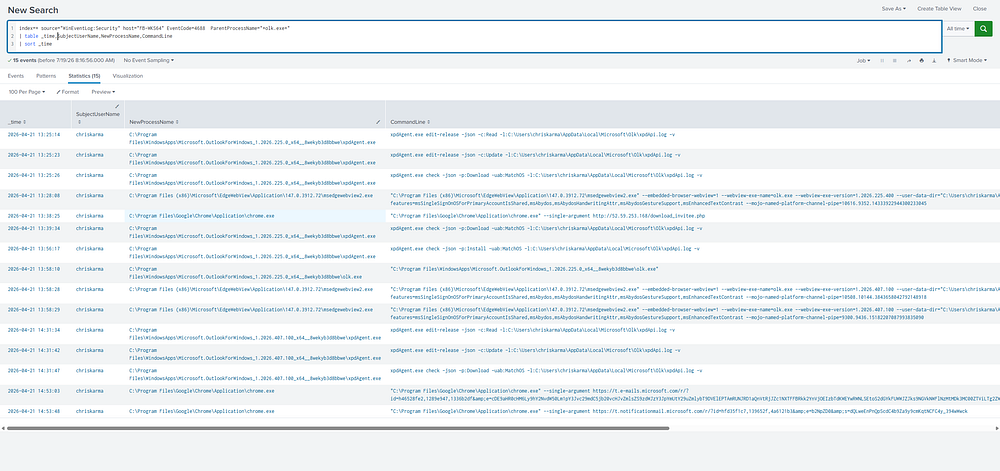
As you can see, the very first thing the author does is find out who from a what. This is important. The author took this approach because the identity of the compromised user is always coupled with an IoC. That is how we defenders even consider a system or account to be at risk. An IoC is an Indicator of Compromise. Examples include unusual network activity, unusual sign-ins, system changes, unintended software installation, and much, much more. In our case, the SIEM log showing the user being directed to browse a suspicious IP address via a Chrome process launched from Outlook. At the beginning of the writeup you can see a screenshot of that SIEM. The author uses what appears to be Splunk. Taking a look at the search command, you can see ("source="WinEventLog:Security"). This is just the Splunk software pulling up Windows event logs from the centralized server. Here you can start to understand what centralized means.
Command:
index=* source="WinEventLog:Security" host="FB-WKS64" EventCode=4688 ParentProcessName="*olk.exe*"
| table _time, SubjectUserName, NewProcessName, CommandLine
| sort _time
Let us break down why Amin chose to run this specific command. If you look at the index=*, the '*' in this case represents a wild card. Meaning anything can fit here, kind of like the joker in a deck of cards. Amin does not care about the index of where it came. Just that it came from a Windows Event Log. Remember not to confuse index with input stream. Where the data lives now is not where it was pulled from. Source = WinEventLog:Security is obvious to us all. But the most clever thing about this, is the event code and ParentProcessName. Amin knew that this was an email, so he knew that the parent processor would be recieved from outlook. The rest of the command is just how you want that data presented while searching. We can cover that in detail later. You can do all kinds of cool commands that give you unique visualizations into your data. Before moving onto the rest of the medium post, let's take a look at SOC workflows and tools. Understanding the tools is the only way to truely understand the way these work.
This is usually the workflow of a SOC analyst (simplified):
- Ingest Logs
- Analyze Timelines
- Correlate Events
- Mitigate/Remediate
- Report
Collection
One may start to wonder, how do we ensure the right data is collected? That's when we will have to introduce some different types of SOC tools that are used. Some of these overlap in functionalities, but believe me, these tools are unique in their own ways for their own reasons.
Here is the list of what SOCs use to triage their information. But also when they are important to use.
Security Information and Event Management (SIEM)
A SIEM is a solution deployed to collect, aggregate, and analyze large volumes of data from organization-wide applications, devices, servers, and users in real time. [3] It organizes data into human-readable chunks so we are able to correlate events and systems. A SIEM is information only; it doesn't have any functionalities that take a proactive approach. Rather, it is an analytical tool.
Endpoint Detection and Response (EDR)
EDRs are heavily utilized, as they give the advantage of speed. Now think of it like you have a castle. The SIEM takes all of the gossip and news of the towns nearby and aggregates them together to make decisions. After receiving ill news that a town is being attacked, it can send its forces to mitigate that threat, but only via King's approval. An EDR is like a mini garrison waiting in the towns in case of attack. It sits on the localized system and contains pre-defined controls and alert systems.
User and Entity Behaviour Analytics (UEBA)
UEBA's are being used more and more in today's cybersecurity environment. UEBA is a type of security software that uses behavioral analytics, machine learning algorithms, and automation to identify abnormal and potentially dangerous user and device behavior. [6] With the advent use of artificial intelligence, this is now almost coupled with SIEMs. The best analogy for this would be to think of a smartphone and the internet; they weren't mutually inclusive to each other until recently. You can't use one without the other (for the most part).
Threat Intelligence Platforms (TIPs)
Intelligence has been used since the dawn of time to give us an advantage over our adversaries. The power of knowledge stumps that of any skill. If someone has the knowledge of what and where, he inherits countless opportunities to mitigate and relieve that threat. We can cover the history of computer viruses and worms, but to just give the jist of it, threat intelligence platforms weren't really all that popular before 2012. People mainly used to share intelligence just via emails and word of mouth. One of the earliest threat intelligence platforms was Threatstream. But that is commercial; Around the same time STIX was developed to standardize how threat information is to be relayed. Now, different systems can understand the same data. [8] It was created by MITRE, in collaboration with DHS. [8] They soon realized that this could be very beneficial to the public in order to protect commercial/private entities.
Vulnerability Management Systems
The last type of system we should bring up is VMS. A Vulnerbaility Management System is exactly as it sounds. It actively scans the network looking for vulnerable devices. While EDR focuses on detecting and mitigating threats on endpoints as they happen, vulnerability scanners work proactively to identify potential weaknesses across systems before they’re exploited. [10] It's just a matter of timing; yes, their specifics may differ a bit, but the important thing to understand is the timing. One actively looks for threats, while the other's job is to mitigate ongoing attacks.
The Lure Page
After the author confirmed who (in this case, it was "chriskarma") was targeted. The only logical thing to do is understand exactly what that payload is. What happened after that one Outlook process? Thus, we need Suricata. But I also want you reader to take a look at one of the arguments we used. EventCode=4888, this is specific to Windows Event Log. Each log application has their own numbers system that alerts of different events. In our case, 4688 is the event of a 'new program or new process' [11]. Again, it's important to remember that these numbers may be different in other applications. For example, sysmon (similair to Windows Event Logs) has the number 1 as placeholder for new program creations.
(image from medium post)
Command:
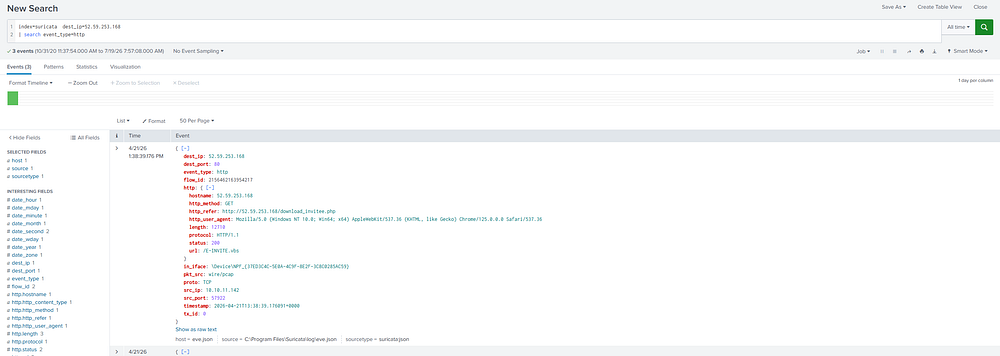
index=suricata dest_ip=52.59.253.168
| search event_type=http
Suricata is an open-source network and analysis tool. It will allow the author to see exactly the contents of the executed process. In this case he is trying to locate the HTTP response to our previous Chrome process (that came from Outlook).
(image from medium post)
It is not crucial that you not leave until you understand every single line of that HTTP response. What is important is where we went, what was done, and was it successful. Thus, we look at 'status:', 'dest_ip', 'dest_port', 'http_refer', 'url' and 'timestamp'. Using these 4-5 arguments we are able to establish verifiable evidence of ill behavior. Here the http_refer demonstrates that for the HTTP entry a second request was initiated, and it downloaded the artifact 'E-INVITE.vbs'.
Picking Apart the Artifact
Analyzing and reverse engineering malware is a huge part of cybersecurity. Now reverse engineering malware can get very technical and convoluted. Fortunately for SOC analysts and defenders just looking at the how, what, where, and when is usually enough to figure out what events took place.
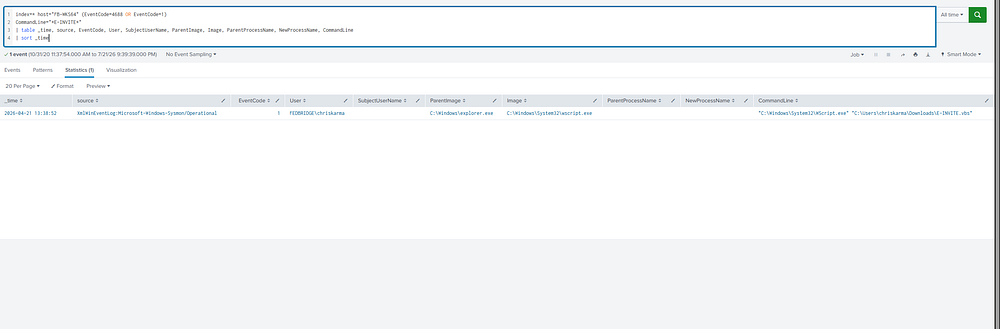
There it is, `explorer.exe` spawning `wscript.exe` against `C:\Users\chriskarma\Downloads\E-INVITE.vbs` at 13:38:52. Parent is Explorer, not the browser, which tells you the user downloaded it and then double clicked it themselves rather than it running automatically. Small detail but it matters for the timeline.
(image from medium post) *notice the event code 1 for sysmon*
I want you to actually take a second to try and understand the command that was entered. If you were Splunk and I came to you and said this, what am I asking of you?
Following the Breadcrumbs
Parent process is a clue; when Sysmon shows Explorer as the parent of wscript.exe all it's saying is that the wscript.exe was launched via Explorer (interactively). Meaning a user had double-clicked the file within File Explorer. Always correlate timestamps and other logs into the equation. As well as checking the command line. That is your best chance at non-repudiation. Remember to correlate the event ID for process creation (WEL 4688) with browser/email logs, network connection logs, user activity logs, and file creation logs. What we see above proves to us that this was a user-initiated execution.
Amin does a splendid job going into detail of what actually occurred and why he took that approach. I want to focus on the why of his approach. Immediately after finding out about the wscript.exe process, the author decided to target the parent image (process). A pattern emerges out of this. Following the breadcrumbs while constantly validating your information is vital to the success of a good threat hunter or blue teamer. Your motive is to look for outliers. Now, what constitutes an outlier? The decision of choosing these outliers is what separates our skills as threat hunters. I will provide a short checklist that will provide us with enough evidence to answer.
An Outlier's Trail
- Deviation - Number one thing is behavior deviation, unusual processes being created. Example, an outlook process spawning in child processes that use 100% of your CPU. It is also important to look for unusual names and commands.
- Time Anomaly - Humans are creatures of habit, we are able to determine whether something that occured at night or in daytime is/isn't a normal workflow.
- Mismatch of Use - Unusual Actions from users who aren't responsible for the current task. Example, someone in accounting downloading and encrypting some network drives.
- Chain of Corroboration - This could fit under deviation but it's important to define. Events taking place that are benign and subtle in and of themselves but when coupled with other weak signals, it becomes an outlier. Example, pinging your home router, followed by a process creation of nmap, followed by network to raw IP traffic, followed by a script that uploads to Google Drive.
It is also important that I explain how a PowerShell process was able to open Chrome and redirect to a Google Drive export link. Within the writeup the author mentioned that the wbscript.exe spawned in another process creation. "powershell.exe -NoProfile -ExecutionPolicy Bypass -File C:\Users\CHRISK~1\AppData\Local\Temp\gdrive_download_93330ba7.ps1" the extension .ps1 establishes this as a powershell script. That is important to understand when viewing how it was able to link to that Google Drive. Powershell scripts have been used for a long time. In fact, it's the most used as a post-exploitation tool. Because of the default enabling of its settings and widespread use amongst administrators [12]. The solution to this is enabling Group Policy to block scripts from blindly executing. Or monitor parent-child processes.
Following the download and archive extraction, the operator did a very clever trick of utilizing a real PDF as cover while the malware ran in the background. Cybersecurity is filled with these little clever tricks. Kind of like a battlefield of tactics and strategies. Understanding these tricks is essential to becoming a great threat hunter. Some tips that should help to avoid falling into this trap.
Avoiding the Fox
- Stop Interacting - If you suspect you just opened a malicious email or file. Do not click anything else. Especially DO NOT REBOOT. Unless told to by SOC or IT.
- Screenshot - First you must take a screenshot of the window and email headers.
- Telemetry/Logging - Note what occurred during or around the time of action. For example, settings popped up, followed by two powershell windows. It is also important to note the files and file extensions of these processes.
- Isolate - If you suspect active malicious behaviors, the best thing to do is unplug your ethernet. Now some people may advise against this; there are situations where it's actually better not to unplug, but for the most part it serves a purpose.
- Report - The most important and vital part to ensure this never happens again is to report it to IT. This is done less than one might think.
Analyzing the Weeds
What do we do when we are lost in the logs? When you're deep in the investigation, the logs can become messy. Let's learn how to navigate them. In the section under "# FileServer.exe goes to work." He mentioned that it spawned a long chain of recon commands. These programs (Fileserver.exe) are what we call loaders. Its job is to run on the host, enumerate the environment, and execute follow-up actions. If you want the detailed version, this would be a good time to read under the section "# FileServer.exe goes to work." The takeaway is that utilizing Splunk, we are able to locate exactly what commands were executed. These commands are typical for anyone trying to do reconnaissance.
VirusTotal
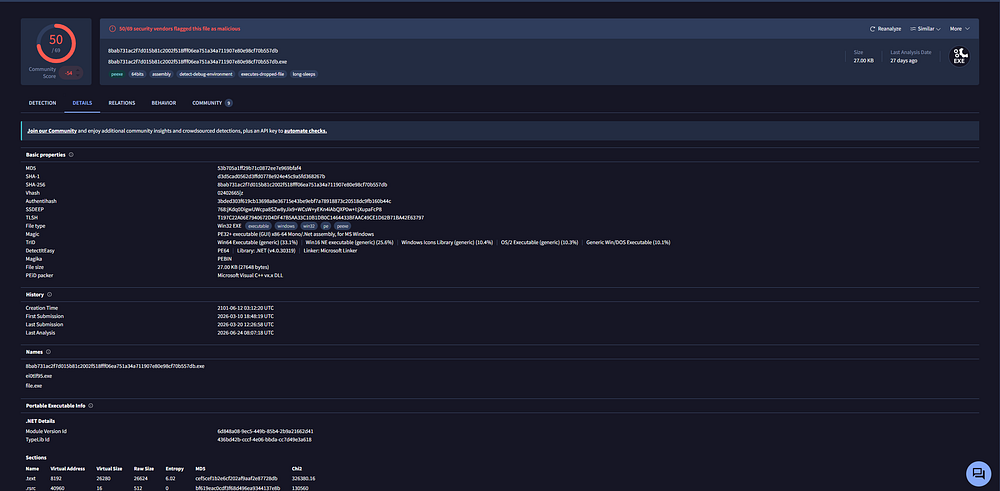
Verification of results is vital to the success of your analysis. Amin demonstrates that within his writeup. Utilizing strong tools can cut your costs and efforts considerably. VirusTotal was created in 2004; it emerged as our guardian and savior. [13] It's free to use and uses a collection of antiviruses to hand you the best results possible. For privacy reasons, a good practice is to hash the file and pass that hash value instead of uploading files directly. Using VirusTotal during your investigation, you can monitor and track analytics and behaviors. You are also able to see metadata and information that will aid you in your investigation. It compares the file against a huge database of known malwares. You are able to check URLs, files, domains, IP addresses, and file hashes.
(image from medium)
Fitting the Role
During this stage, trying to understand the attacker is a good way of gaining an intuition for the situation.
- Anchor yourself to the current IoC and use that as the starting block to build your case.
- Avoid noise; if it's not within your scope of concern, notate it and skip.
- Heavily consider the process of parent/child relationships.
- Whilst building your case, mentally separate the actions of the victim from the perpetrator. This causes confusion, and it allows teams to find real threats and save time.
- Mark essential pivot points for the attacker. For example, where did he first try to run his PowerShell script? Where was his first attempt to sign on, and which account was it? Going further, if you are able to map all of these together, then you won't have a problem building your timeline of events. Some of those you won't be able to correlate, and that's okay.
- Attach events to strategies. For example, VBS was used to gain a foothold and the Google Drive event was just to deliver the payload.
Frameworks
If you want to follow specific frameworks, look into MITRE (ATT&CK and D3FEND techniques), Diamond model of Intrusion [14], Cyber Kill Chain [15], SANS PICERL, OWASP Testing Guide, and others. These are just some of the frameworks, it's important to visit all of these at least least once. Get yourself comfertable with some of these frameworks as they are heavily utilized in the field of cybersecurity.
Command and Control
After the author ran those two programs in VirusTotal and confirmed his suspicions. He shifted his focus on following where the data was going to end up. Adversaries who want maximum longevity and exploitation opportunities usually use C2 servers. C2 servers are vital to a successful and smooth cyberattack. So weeding those out is vital. Following its path, the author discovered the attacker's mistake of using the same IP address for the initiation of the attack, the reverse shell connection attempt, and exfiltration of data. Amin also discovered the attacker was using incorrect usernames when trying to locate folders to extract. One small syntax error or mistake can break the whole attack chain. Unfortunately, less than a second later the logs showed the attacker utilizing the correct username. This could be part of the script itself, but usually attackers don't risk exposure. So it is most likely a mistake.
So how do we spot these C2 servers? We obviously won't be presented with a gift basket by the adversary saying exactly where its pipeline is. A short checklist that will aid in locating the hidden programs that point to the C2 server.
- Check for rare outbound connections to never-before-seen IPs with uncommon ports.
- Connections at unusual times
- Absurdly long connection times
- Oddly suspicious patterns (from network logs), specific DNS queries every 12.5 minutes. [15]
- Be wary of traffic to hosting providers or cloud storage providers.
- Network traffic with self-signed certs and no User-Agent
- The C2 server itself serves no purposeful business to you; understanding why it's there can help you determine that.
If you find something suspicious and you want irrevocable truth that this here is a C2 server, you will need to correlate it with the host artifacts. The same way the author of the writeup was able to find it by following the parent/child lineage of the very first IoC.
Thank you for reading this writeup.
Moustafa Kashen
Sources:
https://www.microsoft.com/en-us/security/business/security-101/what-are-indicators-of-compromise-ioc
https://www.cybernx.com/soc-tools/
https://www.microsoft.com/en-us/security/business/security-101/what-is-siem
https://www.crowdstrike.com/en-us/cybersecurity-101/endpoint-security/endpoint-detection-and-response-edr/
https://www.microsoft.com/en-us/security/business/security-101/what-is-user-entity-behavior-analytics-ueba
https://www.ibm.com/think/topics/ueba
https://www.recordedfuture.com/blog/cybersecurity-history
https://www.einpresswire.com/article/462519921/anomali-launches-comprehensive-threat-platform-to-detect-and-respond-to-cyber-attacks
https://www.sekoia.com/glossary/stix
https://www.invicti.com/blog/web-security/edr-vs-vulnerability-scanner
https://www.deepwatch.com/labs/windows-event-4688/
https://www.manageengine.com/log-management/cyber-security/powershell-cyberattacks.html
https://www.devoteam.com/expert-view/virustotal-threat-analysis/
https://www.eccouncil.org/cybersecurity-exchange/ethical-hacking/diamond-model-intrusion-analysis/
https://www.lockheedmartin.com/en-us/capabilities/cyber/cyber-kill-chain.html
https://deepstrike.io/blog/what-is-dns-data-exfiltration
https://hunt.io/blog